Integrated Drive Mode Control System
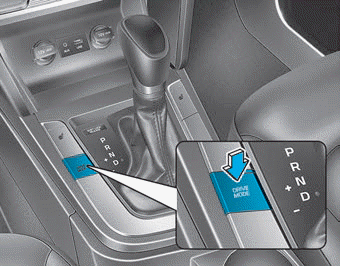
The drive mode can be selected according to driver preference or road conditions.
Information
If there is a problem with the instrument cluster, the drive mode will remain in NORMAL mode and cannot be switched to SPORT mode.
The mode changes as shown below each time the DRIVE MODE button is pressed.
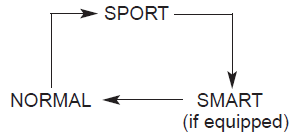
Normal Mode
In NORMAL mode, the engine and transmission control logic work together to provide everyday driving performance with good fuel economy.
- When NORMAL mode is selected, it is not shown on the instrument cluster.
SPORT Mode

SPORT mode enhances driving dynamics by automatically adjusting steering effort as well as the engine and transmission control logic to improve driver performance.
- When SPORT mode is selected by pressing the DRIVE MODE button, the SPORT mode indicator illuminates.
- Whenever the engine is restarted, the drive mode returns to NORMAL mode. If SPORT mode is desired, select SPORT mode again using the DRIVE MODE button.
- When SPORT mode is activated:
- Engine speed will remain elevated for a certain period of time, even after the accelerator pedal is released
- Upshifts are delayed during acceleration
Information
Fuel economy may decrease in SPORT mode.
SMART Mode

SMART mode selects the appropriate drive mode between NORMAL and SPORT by evaluating the driver's driving style (for example, economical or aggressive) from brake pedal application or steering wheel operation.
- Press the DRIVE MODE button to select SMART mode. When SMART mode is on, the indicator light on the instrument cluster illuminates.
- The vehicle is equipped with a monitoring unit. The indicator illuminates green when the driver's driving is classified as economical. It illuminates white when the driver's driving is considered normal. It illuminates yellow when the driver's driving is classified as sporty, such as during sudden braking or sharp cornering.
- Whenever the engine is restarted, the drive mode remains in SMART mode.
- SMART mode automatically controls the shift patterns and engine torque according to the driver's driving style.
Information
When you drive dynamically in SMART mode, the drive mode changes to SPORT mode if you brake suddenly or corner sharply. However, this may adversely affect fuel economy.
Various driving situations you may encounter in SMART mode
- The drive mode automatically changes to SMART SPORT when you accelerate the vehicle rapidly or steer the steering wheel several times (your driving is classified as sporty). In this mode, your vehicle shifts to a lower gear for rapid acceleration/deceleration and increases engine braking efficiency.
- You may still feel engine braking when you release the accelerator pedal in SMART SPORT mode. This is because your vehicle remains in a lower gear for a certain period of time for the next acceleration. Therefore, this is a normal driving situation and does not indicate a malfunction.
- The drive mode changes to SMART SPORT mode only in severe driving conditions. In most normal driving situations, the drive mode is set to SMART NORMAL mode.
SMART Mode Limitation
SMART mode may be limited in the following situations. (The OFF indicator illuminates in these situations.)
- The driver manually moves the shift lever: this deactivates SMART mode. The vehicle moves when the driver manually moves the shift lever.
- Cruise control activated: The cruise control system may deactivate SMART mode when the vehicle is driven at a set speed by the Smart Cruise Control system. (SMART mode is not deactivated by simply turning on the cruise control system.)
- Transmission fluid temperature is either very low or very high: SMART mode may be active in most normal driving situations. However, extremely high or low transmission fluid temperature may temporarily deactivate SMART mode, because transmission conditions are not within normal range.
Test yourself
A quick Hyundai Elantra AD quiz: every answer comes with an explanation and a link to the manual page.