Driving Your Vehicle
System Settings and Operation
In this manual: Driving Your Vehicle
~1min read
System Settings
- To activate the Driver Attention Warning (DAW) system, turn on the engine, then select "User Settings" → "Driver Assistance" → "Driver Attention Warning" → High Sensitivity / Normal Sensitivity / Off.
- The driver can select the Driver Attention Warning (DAW) system mode.
- High Sensitivity: The DAW system helps warn the driver of his/her fatigue level or inattentive driving faster than the normal mode.
- Normal Sensitivity: The DAW system helps warn the driver of his/her fatigue level or inattentive driving.
- Off: The Driver Attention Warning system is turned off. - The Driver Attention Warning system setting will be saved and applied when the engine is restarted.
Driver Attention Level
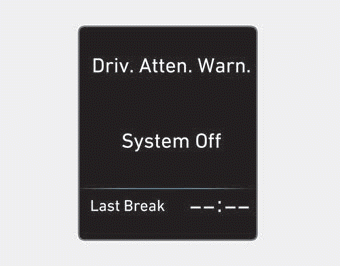
■ System Off
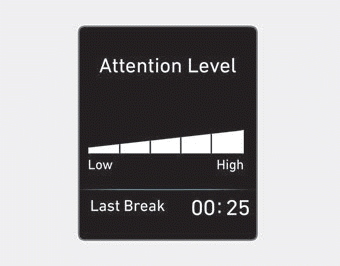
■ Attentive Driving
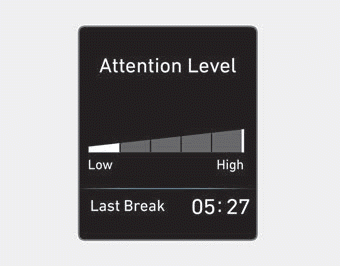
■ Inattentive Driving
- The driver can monitor driving conditions on the instrument cluster LCD. The DAW screen will appear when you select the Assist mode tab (
 ) on the LCD if the system is activated. For more details, refer to "LCD Display Modes" in chapter 3.
- The driver attention level is displayed on a scale from 1 to 5. The lower the number, the less attentive the driver.
- The number decreases when the driver does not take a break for a certain period of time.
- The number increases when the driver drives attentively for a certain period of time.
- When the driver turns on the system while driving, the "Last Break Time" and level are displayed.
Take a Break

- The message "Consider Taking a Break" appears on the cluster LCD and a warning sound is given to recommend that the driver take a break when the driver attention level is below 1.
- The Driver Attention Warning (DAW) system will not recommend a break when the total driving time is less than 10 minutes.
Test yourself
A quick Hyundai Elantra AD quiz: every answer comes with an explanation and a link to the manual page.
Was this page helpful?