Turn Signal and Lane Change Signal
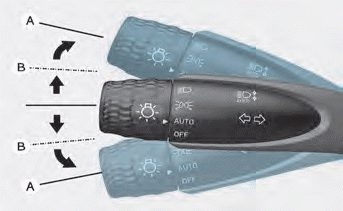
To signal a turn, push the lever down for a left turn or up for a right turn to position (A). To signal a lane change, move the turn signal lever slightly and hold it at position (B). The lever will return to the OFF position when released or when the turn is completed.
If the indicator stays on without flashing or flashes abnormally, one of the turn signal bulbs may have burned out and need replacement.
One Touch Turn Signal Function
To activate the one touch turn signal function, move the turn signal lever slightly and then release it. The lane change signal will flash 3, 5 or 7 times.
You can activate or deactivate the One Touch Turn Signal function, or select the number of flashes (3, 5 or 7), from User Settings Mode on the LCD display.
For more details, refer to "LCD Modes" in chapter 4. If your vehicle is equipped with optional navigation, refer to the separately supplied infotainment system manual.
Test yourself
A quick Hyundai Elantra CN7 quiz: every answer comes with an explanation and a link to the manual page.