Convenience Features
USB Charger
In this manual: Convenience Features
~1min read
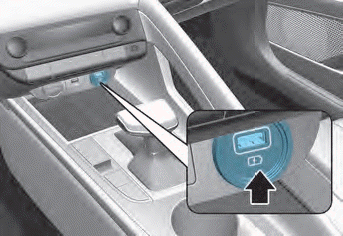
Insert the USB charger into the USB port to charge your smartphone or tablet PC.
- A charging status/charging complete message is displayed on the screen of the smartphone or tablet PC.
- The smartphone or tablet PC may become warm during charging. This does not indicate a malfunction of the charging system.
- A smartphone or tablet PC that accepts another charging method may not be charged properly. In this case, use the exclusive charger for your device.
- The charging terminal is for charging devices only. Do not use the charging terminal to play audio or multimedia on the infotainment system.
Test yourself
A quick Hyundai Elantra CN7 quiz: every answer comes with an explanation and a link to the manual page.
Was this page helpful?