Engine Electrical System
Description and Operation
In this manual: Engine Electrical System
9steps
~54min
2/5difficulty
Done 0 of 9
Description
The Smart Cruise Control System allows the driver to program the vehicle to control speed and following distance by detecting the vehicle ahead, without pressing the brake pedal and accelerator pedal.- Speed Cruise Control: The vehicle maintains the set speed when there are no vehicles ahead.
- Deceleration Control: The vehicle decelerates when a vehicle ahead is detected.
- Following Distance Control: The vehicle maintains the selected following distance.
- Acceleration Control: The vehicle accelerates to the set speed when no vehicle ahead is detected.
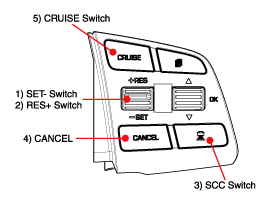
- Heavy Traffic Control: In traffic jams, your vehicle will stop if the vehicle ahead of you stops. Also, if the vehicle ahead starts moving, your vehicle will also start moving. However, if the vehicle has been stopped for more than 3 seconds, you must press the accelerator pedal or press the RES+ switch to start moving.

- Curve Control and Function
- The sensor may not detect a vehicle ahead, or may detect a vehicle in other lanes, because the detection range of the sensor is limited.
- On curves, if a vehicle equipped with SCC is set to travel at high speed, it may slide sideways. This means the speed may be reduced even when there is no vehicle ahead (without SCC braking control).
- When following a vehicle ahead on a straight road, if the vehicle ahead enters a curve, the vehicle equipped with SCC may accelerate to return to the set speed.
- On curves, if the vehicle ahead moves out of the detection range, the vehicle will not accelerate to the set speed and will maintain the current speed to prevent repeated acceleration and deceleration. (If the vehicle equipped with SCC changes lanes or the accelerator pedal is applied, the vehicle will accelerate.)
- Warning Signal If the vehicle equipped with SCC decelerates because the vehicle ahead is braking or cutting into your lane, a warning will be issued.
- If the vehicle equipped with SCC can decelerate properly by the system – no warning
- If the vehicle equipped with SCC cannot decelerate properly by the system
A. The indicator in the cluster will flash and the warning buzzer will stop. (The warning and system deceleration will continue until the brake pedal is pressed.) - If the vehicle ahead (vehicle speed: less than 30 km/h) moves out of your lane while distance control is active, a warning sound will be heard and a message will be displayed. Adjust your vehicle speed to avoid collisions with other vehicles or objects that may suddenly appear in front of you.
- Driver Acceleration Although the vehicle is decelerated by the SCC system, the vehicle can be accelerated by pressing the accelerator pedal. If the vehicle accelerates above the set speed, the indicator in the cluster will flash.
• Smart Cruise Control Operating Conditions
- Vehicle speed approximately 0 to 180 km/h
- Transmission in D or Sport mode
- "ESP OFF" switch OFF
- "ESP OFF" switch OFF
- "CRUISE" switch ON (CRUISE indicator on)
- "CRUISE" switch OFF
- Turn on the "CANCEL" switch
- Brake Pedal Pressed
- Driver's Door Open
- Vehicle speed is above 180 km/h.
- Stopped on a Steep Slope
- SCC Stop Lasting More Than 5 Minutes
- Repeated SCC Stop and Go for a Long Time
- When you try to start the vehicle after the vehicle ahead has stopped far from your vehicle during SCC automatic stop
- Transmission in N, P or R
- ESP/TCS/ABS operation
- Accelerator pedal pressed for more than 60 seconds
- "ESP OFF" switch ON (ESP OFF indicator on)
- Parking brake applied
- System malfunction (warning indicator on)
- Crack, damage or incorrect installation of the Smart Cruise Control unit cover (warning indicator on)
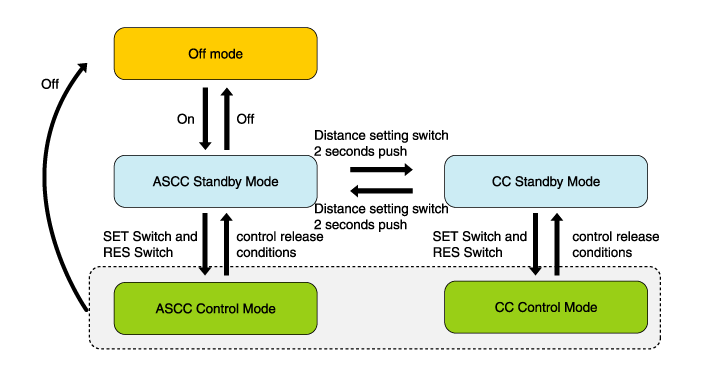
- Cruise Control Function The driver can use only the cruise control mode (speed control function) by performing the following: With the Smart Cruise Control system on (the cruise indicator will illuminate, but the system will not be activated), press and hold the distance setting switch for more than 2 seconds to switch between "Smart Cruise Control (SCC) mode" and "Cruise Control (CC) mode". The speed control in cruise control mode is the same as in Smart Cruise Control mode. When using cruise control mode, the driver must manually adjust the distance to other vehicles, as the system will not automatically brake to decelerate for other vehicles.
|
| Display | Description |
 |
Distance 1 - with vehicle ahead |
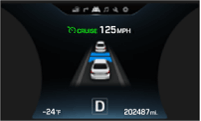 |
Distance 2 - with vehicle ahead |
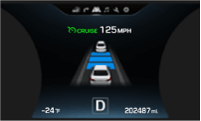 |
Distance 3 - with vehicle ahead |
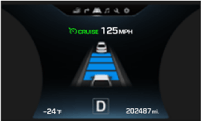 |
Distance 4 - with vehicle ahead |
 |
SCC System Malfunction |
Test yourself
A quick Hyundai Genesis DH quiz: every answer comes with an explanation and a link to the manual page.
Was this page helpful?