Park Assist System


The Parking Assist System (PGS) is activated when the backup light is ON with the Engine Start/Stop button in the ON position and the gear selector lever in the R (Reverse) position.
The Parking Assist System does not replace proper and safe parking procedures. The parking assist system may not detect every object around the vehicle.
Always drive safely and use caution when parking.
WARNING
This is an optional system. It is the driver's responsibility to always check the area around the vehicle when parking.
Parking Assist System (PGS) Display
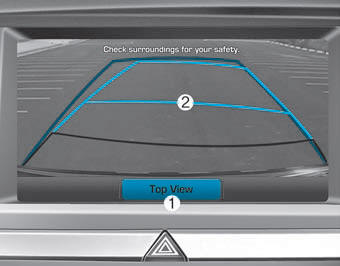
1. Changing the Rear View Angle
Changes the rear view camera angle. (Top View ↔ Normal View)
2. Parking Guide Line
Based on the steering angle, a parking guide line is displayed to assist with parking.
Changing the Rear View Angle
1. Top View

When Top View is selected, the rear view is displayed as if you were looking down from above.
2. Normal View

When Normal View is selected, the rear view is displayed in the normal rear view perspective.
WARNING
- Never rely solely on the rear view display when backing up.
- ALWAYS look around the vehicle to make sure there are no objects or obstacles before moving the vehicle in any direction to prevent a collision.
- Always pay close attention when the vehicle is moving near objects, especially pedestrians, and especially children.
✽ NOTICE
Always keep the camera lens clean. The camera may not operate properly if the lens is covered with foreign material.
Test yourself
A quick Hyundai Genesis DH quiz: every answer comes with an explanation and a link to the manual page.