Multimedia System
Making a Call Using the Steering Wheel Remote Control
In this manual: Multimedia System
~1min read
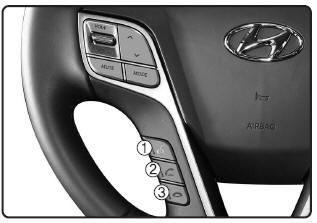
1)  button: Activates voice recognition.
2)  button: Places and transfers calls.
3)  button: Ends a call or cancels functions.
Checking the Call History and Calling
➀ Briefly press (less than 0.8 seconds) the key on the steering wheel remote control.
➁ The call history list will appear on the screen.
➂ Press the key again to connect the call to the selected number.
Redialing the Last Number Dialed
➀ Press and hold (more than 0.8 seconds) the key on the steering wheel remote control.
➁ The last number dialed is redialed.
❈ If there is no call history, a screen asking whether to download the call history will be displayed. (The download function may not be supported on some mobile phones.)
Test yourself
A quick Hyundai Tucson LM quiz: every answer comes with an explanation and a link to the manual page.
Was this page helpful?