Pairing a Bluetooth® Wireless Technology Device
What is Bluetooth® Wireless Technology Pairing?
Pairing is the process of synchronizing your Bluetooth® Wireless Technology phone or device with the vehicle audio system so they can connect. Pairing is required to connect and use Bluetooth® Wireless Technology functions.
WARNING
Driving while distracted can result in loss of vehicle control, crash, serious injury, or death. The driver's primary responsibility is the safe and legal operation of a vehicle, and use of any handheld devices, other equipment, or vehicle systems which take the driver's eyes, attention, and focus away from the safe operation of a vehicle or which are not permitted by law should never be used during operation of the vehicle.
Pairing Key /
 Steering wheel remote control key
When no device has been paired
1. Press the key or
 steering wheel remote control key. The following screen is displayed.
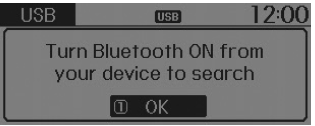
2. Press the [OK] button to display the phone pairing screen.
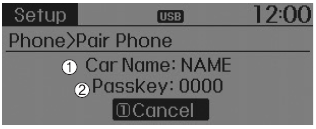
1) Vehicle name: The device name displayed when searching with the Bluetooth® Wireless Technology device.
2) Passkey: The password used to pair the device.
3. On the Bluetooth® Wireless Technology device (e.g., mobile phone), search for and select the vehicle audio system.
[Device Not Supporting SSP] (SSP: Secure Simple Pairing)
4. After a few seconds, a screen prompting you to enter a passkey will be displayed.
Listen, enter the passkey "0000" to connect the Bluetooth® Wireless Technology device to the vehicle audio system.
[Device Supporting SSP]
4. After a few seconds, a 6-digit passkey will be displayed on the screen.
Listen, check the passkey on the Bluetooth® Wireless Technology device and confirm.
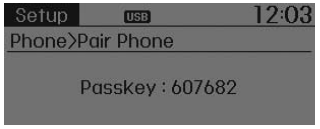
5. When pairing is complete, the following screen will be displayed.
✽ NOTICE
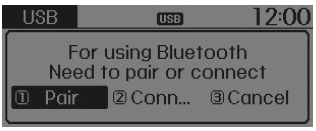
If Bluetooth® Wireless Technology devices are paired but none is currently connected, pressing the  key or the
 key on the steering wheel displays the following screen. Press the [Pair] button to pair a new device, or select [Connect] to connect a previously paired device.
Test yourself
A quick Hyundai Tucson LM quiz: every answer comes with an explanation and a link to the manual page.