Multimedia System
Pairing Through the [PHONE] Setting
In this manual: Multimedia System
~1min read
press key
 Select [Phone]
 Select [Connect Phone].
 Select
 SETUP knob
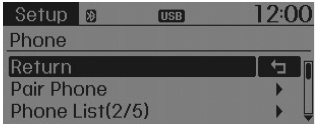
1. The following steps are similar to those described in "If No Devices Are Paired" on the previous page.
✽ NOTICE
- The Bluetooth® Wireless Technology functions supported in the vehicle are as follows. Some functions may not be supported depending on your Bluetooth® Wireless Technology device. Outgoing/incoming hands-free calls; operations during a call (Switch to private, Switch to call waiting, mute/unmute microphone); call history download; mobile phone contacts download; Bluetooth® Wireless Technology device auto connection; Bluetooth audio streaming.
- Up to five Bluetooth® Wireless Technology devices can be connected to the vehicle hands-free system.
- Only one Bluetooth® Wireless Technology device can be connected at a time.
- Other devices cannot be paired while a Bluetooth® Wireless Technology device is connected.
- Only Bluetooth® Wireless Technology Handsfree and Bluetooth Audio functions are supported.
- Bluetooth operations are only possible on devices that support hands-free or audio functions, such as a Bluetooth® Wireless Technology mobile phone or Bluetooth audio device.
- If a connected Bluetooth® Wireless Technology device disconnects due to being out of communication range, the device being turned off, or a Bluetooth® communication error, the system will automatically search for and reconnect to the corresponding Bluetooth® Wireless Technology device.
- If the system becomes unstable due to communication errors between the car audio and the Bluetooth® Wireless Technology device, restart the device by turning it off and on again. When the Bluetooth® Wireless Technology device settings are reset, the system will be restored.
- After pairing is complete, a request to download contacts is sent once to the mobile phone. Some mobile phones may require confirmation when receiving the download request; make sure your mobile phone accepts the connection. Refer to your phone's owner's manual for more information on phone pairing and connection.
Test yourself
A quick Hyundai Tucson LM quiz: every answer comes with an explanation and a link to the manual page.
Was this page helpful?