Key Registration
Case 1: When the ignition key has been lost or additional spare ignition key is required.
- Prepare a new spare ignition key.
- Cut the key in accordance with the shape of the current ignition key.
- Remove the rear seat (see Rear Seat Removal in the Frame chapter).
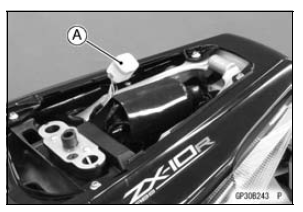
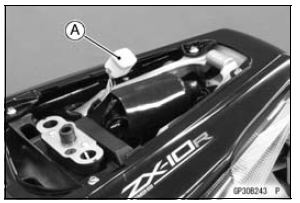
- Remove the immobilizer/Kawasaki diagnostic system connector cap [A].
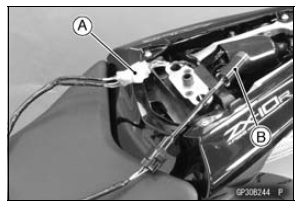
- Connect the key registration unit [A] and key registration adapter [B] as shown in the figure.
Special Tools - Key Registration Unit: 57001-1582 Key Registration Adapter: 57001-1746
- Insert the registered ignition key to the ignition switch and turn it to ON.
Verified
- The warning indicator light (Red LED) and immobilizer warning symbol [A] blinks to display the registration mode (go to the next step).
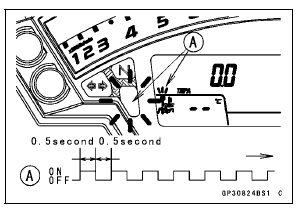
Not Verified
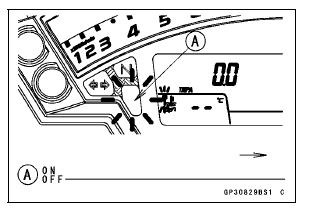
- The warning indicator light (Red LED) and immobilizer warning symbol [A] blinks to display the collation error (refer to the following failure illustrations).
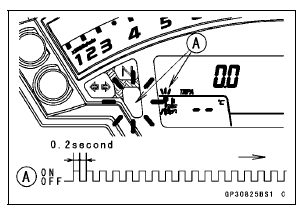
Registered Ignition Key Collation Error
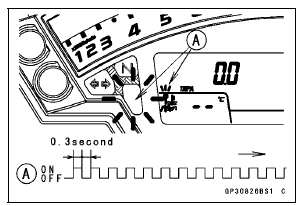
- Turn the registered ignition key to OFF and remove the registered ignition key.
If there are other registered ignition keys, they should all do the procedure above.
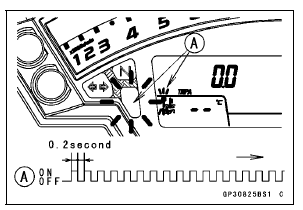
The warning indicator light (Red LED) and immobilizer symbol [A] blinks continuously to display that the ECU is in the registration mode for 15 seconds.

NOTE
- Insert next key and turn ON within 15 seconds after previous key is turned OFF and removed otherwise registration mode will be ended and the warning indicator light (Red LED) and immobilizer symbol stops blinking.
- To return to the registration mode start the registered ignition key(s) verification procedure. This applies to all ignition key registration.
Insert the ignition key 1 to the ignition switch and turn it to ON.
NOTE
- Keep the other ignition key away from the immobilizer antenna.
If there is any problem in the registration, the warning indicator light (Red LED) and immobilizer warning symbol [A] blinks to display the collation error.
Immobilizer Amplifier Failure

When Registered Ignition Key is Inserted.
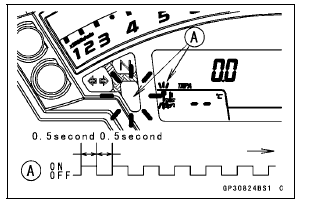
Ignition Key Collation Error
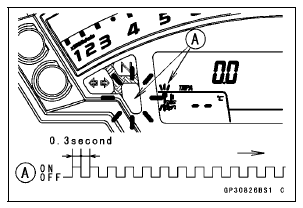
- The ignition key 1 is successfully registered in the ECU.
The warning indicator light (Red LED) and immobilizer warning symbol [A] blinks 3 times and stops for 1 second and then repeats this cycle.
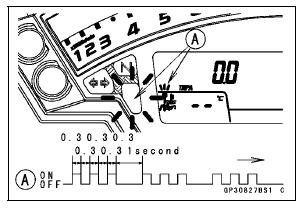
- Turn the ignition key 1 to OFF and remove the ignition key 1.
The warning indicator light (Red LED) and immobilizer warning symbol [A] blinks to display the registration mode.
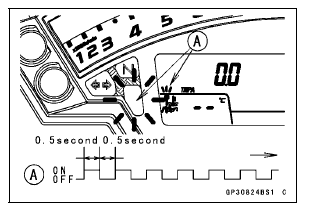
NOTE
- Turn OFF the ignition switch and wait for the period of 15 seconds or more. The registration mode automatically finishes and the warning indicator light (Red LED) and immobilizer warning symbol will switch off.
- This procedure registered the registered ignition key and one ignition key
- Continue with the procedure to register the second and later keys before the 15 seconds period has elapsed.
Insert the ignition key 2 to the ignition switch and turn it to ON.
If there is any problem in the registration, the warning indicator light (Red LED) and immobilizer warning symbol [A] blinks to display the collation error.
Immobilizer Amplifier Failure
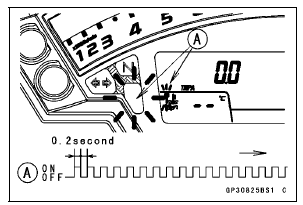
When Registered Ignition Key is Inserted.
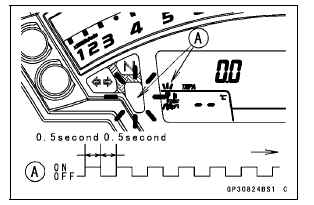
Ignition Key Collation Error

- The ignition key 2 is registered in the ECU.
The warning indicator light (Red LED) and immobilizer warning symbol [A] blinks 4 times and stops for 1 second and then repeats this cycle.
This procedure has registered the registered and 2 ignition keys.
- Continue with the procedure to register an additional one ignition key.
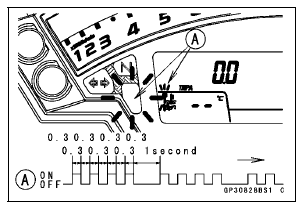
NOTE
The ECU can store up the five key codes.
Ignition Key Indicator Light and Symbol Blinks 
- Turn OFF the ignition switch and wait for period of more than 15 seconds.
- The registration mode automatically ends.
- The warning indicator light (Red LED) goes off [A].
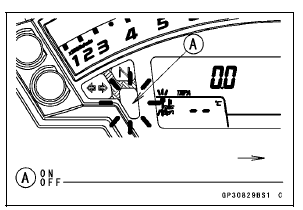
- Remove the key registration unit, key registration adapter and install the immobilizer/Kawasaki diagnostic system connector cap.
NOTE
- Turn the ignition switch to ON with the registered ignition key.
- Check that the engine can be started using all registered ignition keys.
Spare Ignition Key Registration Flow Chart
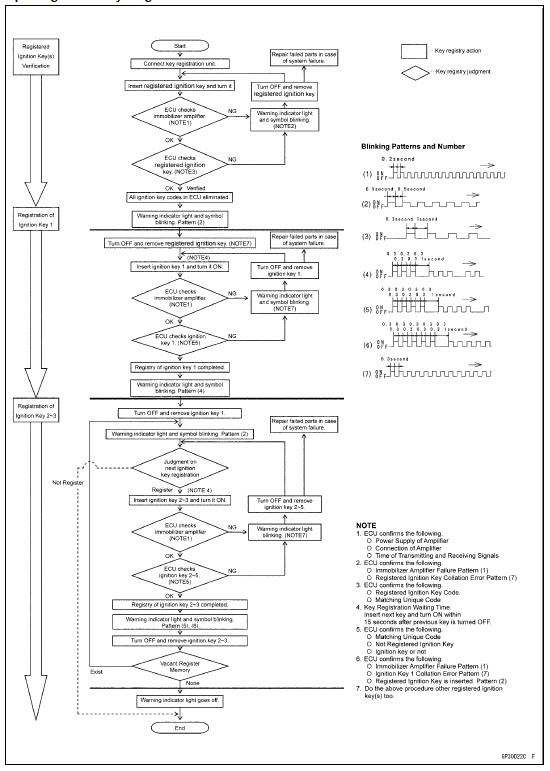
Case 2: When the ignition switch is faulty and to be replaced.
- Prepare a new ignition switch [A] and two new ignition keys [B].
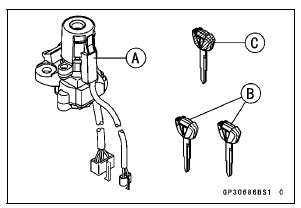
These parts are available as a set. Prepare the current registered ignition key [C].
- Remove: Ignition Switch (see Immobilizer System Parts Replacement) Rear Seat (see Rear Seat Removal in the Frame chapter)
- Remove the immobilizer/Kawasaki diagnostic system connector cap [A].
- Connect the key registration unit [A] and key registration adapter [B].
Special Tools - Key Registration Unit: 57001-1582 Key Registration Adapter: 57001-1746
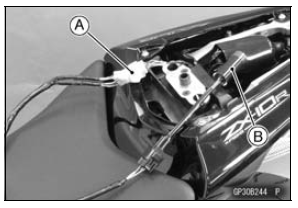
- Connect: New Ignition Switch Lead Connector [A] Immobilizer Antenna Lead Connector [B]
NOTE
Keep the ignition switches more than 15 cm (5.9 in.).
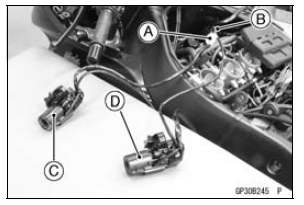
[C] New Ignition Switch [D] Current Ignition Switch
- Insert the current registered ignition key [A] at the current ignition switch [B].
- Insert the new ignition key 1 [C] to the new ignition switch [D] and turn it to ON.
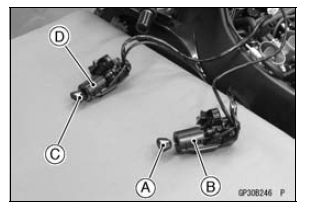
Verified
The warning indicator light (Red LED) and immobilizer warning symbol [A] blinks to display the ECU is in the registration mode (go to the next step).
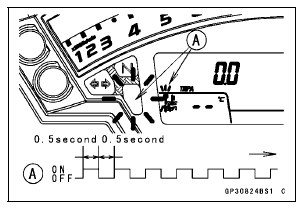
Not Verified
- The warning indicator light (Red LED) and immobilizer warning symbol [A] blinks to display the collation error.

Registered Ignition Key Collation Error
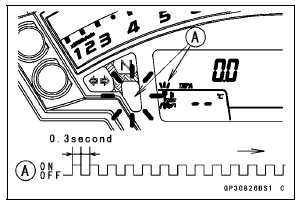
- Turn OFF and remove the new ignition key 1.
- Disconnect the immobilizer antenna connector, then connect the antenna connector of the new ignition switch.
- Insert the ignition key 1 [A] again into the new ignition switch and turn it to ON.
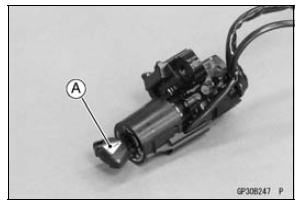
NOTE
- Insert the next key and turn ON within 15 seconds after previous key is turned OFF and removed otherwise registration mode will be ended and the warning indicator light (Red LED) and immobilizer warning symbol stops blinking.
- To return to the registration mode start the registered ignition key verification procedure. This applies to all ignition key registration.
- Keep other ignition keys away from the ignition switch.
If there is any problem in the registration, the warning indicator light (Red LED) and immobilizer warning symbol [A] blinks to display the collation error.
Immobilizer Amplifier Failure
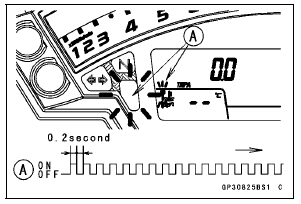
When Registered Ignition Key is Inserted.
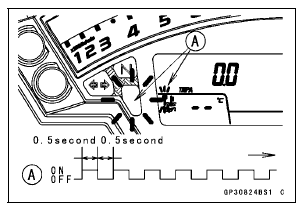
Ignition Key Collation Error
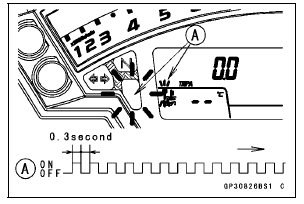
- The ignition key 1 is successfully registered in the ECU.
The warning indicator light (Red LED) and immobilizer warning symbol [A] blinks 2 times and stops for 1 second and then repeats this cycle to indicate successful registering of the ignition key 1.
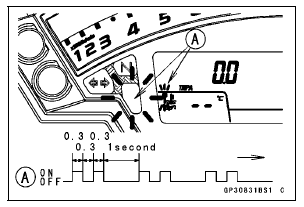
- Turn OFF and remove ignition key 1.
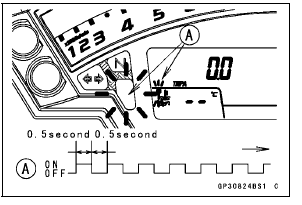
The warning indicator light (Red LED) and immobilizer warning symbol [A] blinks to display the registration mode.
NOTE
- Turn OFF the ignition switch and wait for the period more than 15 seconds. The registration mode automatically ends and warning indicator light (Red LED) goes off.
- This procedure has , registered the registered ignition key and one ignition key.
- Continue the procedure to program the second and later keys.
Insert the ignition key 2 to the ignition switch and turn it to ON.
If there is any problem in the registration, the warning indicator light (Red LED) and immobilizer warning symbol [A] blinks to display the collation error.
Immobilizer Amplifier Failure

When Registered Ignition Key is Inserted.
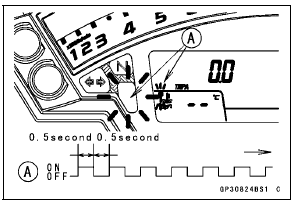
Ignition Key Collation Error
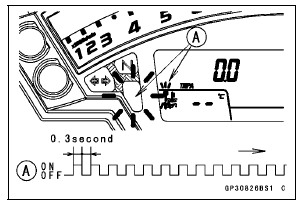
- The ignition key 2 is successfully registered in the ECU.
The warning indicator light (Red LED) and immobilizer warning symbol [A] blinks 3 times and stops for 1 second and then repeat this cycle to indicate successful programming of ignition key 2.
- Turn OFF the ignition switch and wait for periodmore than 15 seconds.
- The registration mode automatically ends.
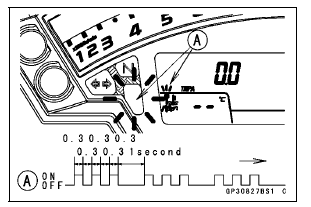
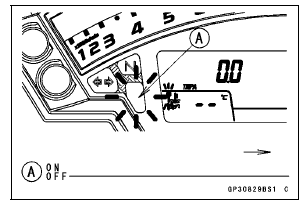
- The warning indicator light (Red LED) goes off [A].
- Remove the key registration unit, key registration adapter and install the immobilizer/Kawasaki diagnostic system connector cap.
NOTE
- Turn the ignition switch to ON with the registered ignition key.
- Check that the engine can be started using all registered ignition keys.
Install the new ignition switch (see Immobilizer System Parts Replacement).
Case 3: When the ECU is faulty and has to be replaced.
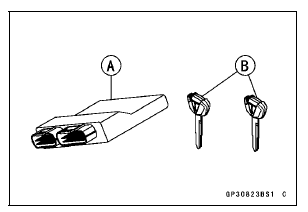
- Prepare a new ECU [A] and current registered ignition key(s) [B].
NOTE
- The key registration unit is not required.
- After replacing the ECU, be sure to register the 2 ignition keys. If the 2 keys are not registered, the engine can not be started.
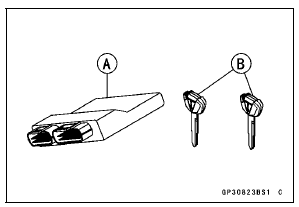
Replace the ECU [A] (see ECU Removal/Installation in the Fuel System (DFI) chapter).
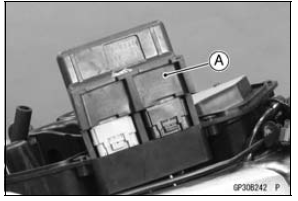
- Insert the current registered ignition key into the ignition switch and turn it to ON.
If there is any problem in the registration, the warning indicator light (Red LED) and immobilizer warning symbol [A] blinks to display the collation error.
Immobilizer Amplifier Failure
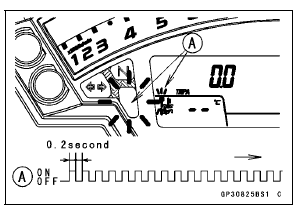
Registered Ignition Key Collation Error
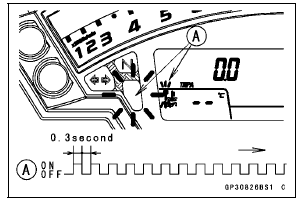
- The registered ignition key is registered in the ECU.
The warning indicator light (Red LED) and immobilizer warning symbol [A] blinks 1 time and stops for 1 second and the repeats this cycle to indicate successful registration of the registered ignition key.
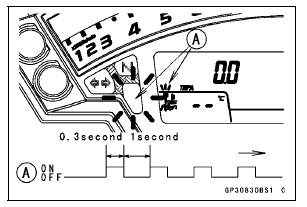
- Turn OFF the registered ignition key and remove it.
The warning indicator light (Red LED) and immobilizer warning symbol [A] blinks to display the registration mode.
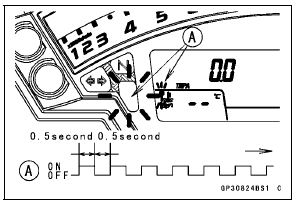
NOTE
- Insert next key and turn ON within 15 seconds after previous key is turned OFF and removed otherwise registration mode will be ended and the warning indicator light (Red LED) goes off.
- To return to the registration mode start the registered ignition key verification procedure. This applies to all ignition key registration.
Insert the other remaining registered ignition key to the ignition switch and turn it to ON.
NOTE
Keep the other ignition keys away from the immobilizer antenna.
If there is any problem in the registration, the warning indicator light (Red LED) and immobilizer warning symbol [A] blinks to display the collation error.
Immobilizer Amplifier Failure
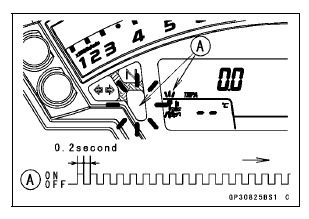
When Registered Ignition Key is Inserted.
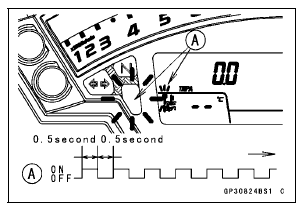
Ignition Key Collation Error
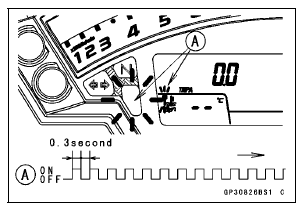
- The other remaining ignition key is registered in the ECU
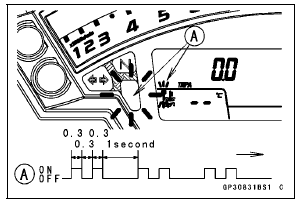
The warning indicator light (Red LED) and immobilizer warning symbol [A] blinks 2 times and stops for 1 second and then repeats this cycle to indicate successful registration of the second ignition key.
- Turn the ignition switch to OFF and wait for period more than 15 seconds.
- The registration mode automatically ends.
- The warning indicator light (Red LED) goes off [A].
NOTE
- Turn the ignition switch to ON with the registered ignition key.
- Check that the engine can be started using all registered ignition keys.
Case 4: When all registered ignition keys are faulty or lost.
The all registered ignition keys replacement is considered very rare case. However if it is required, the following is necessary.
NOTE
The ECU must be replaced with a new one because the registered ignition key code that is registered in the current ECU can not be rewritten.
- Prepare a new ECU [A] and 2 new ignition keys [B].
NOTE
- The key registration unit is not required.
- The key registration process is same as the electric control unit replacement.
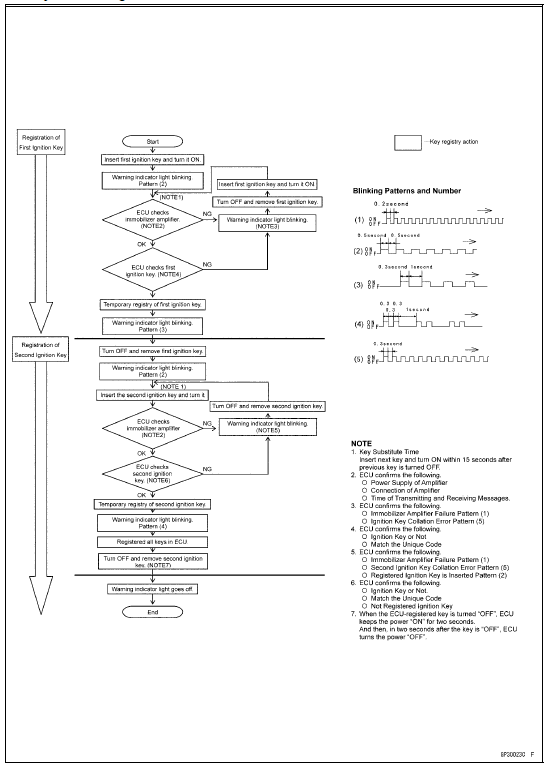
- Insert the first ignition key into the ignition switch and turn it ON.
If there is any problem in the registration, the warning indicator light (Red LED) and immobilizer warning symbol [A] blinks to display the collation error.
Immobilizer Amplifier Failure
Ignition Key Collation Error
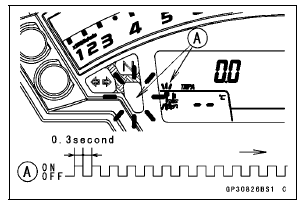
- The first ignition key is registered in the ECU.
The warning indicator light (Red LED) and immobilizer warning symbol [A] blinks 1 time and stops for 1 second and the repeats this cycle to indicate successful registration of the first ignition key.
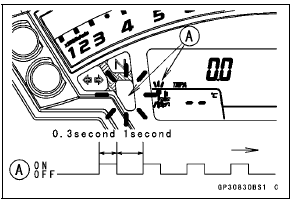
- Turn OFF the first ignition key and remove it.
- The warning indicator light (Red LED) and immobilizer warning symbol [A] blinks to display the registration mode.
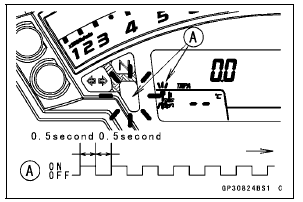
NOTE
- Insert next key and turn ON within 15 seconds after previous key is turned OFF and removed otherwise registration mode will be ended and the warning indicator light (Red LED) goes off.
- To return to the registration mode start the registered ignition key verification procedure. This applies to all ignition key registration.
- Insert the second ignition key to the ignition switch and turn it ON.
NOTE
Keep the other ignition keys away from the immobilizer antenna.
If there is any problem in the registration, the warning indicator light (Red LED) and immobilizer warning symbol [A] blinks to display the collation error.
Immobilizer Amplifier Failure
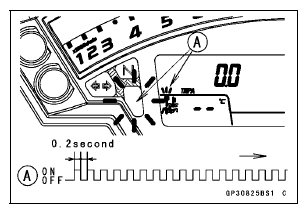
When Registered Ignition Key is Inserted
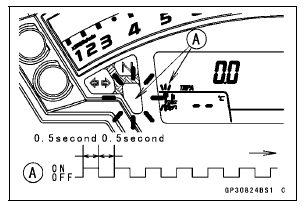
Ignition Key Collation Error
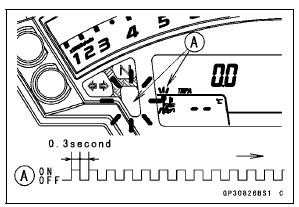
- The second ignition key is registered in the ECU.
The warning indicator light (Red LED) and immobilizer warning symbol [A] blinks 2 times and stops for 1 second and then repeats this cycle to indicate successful registration of second ignition key.
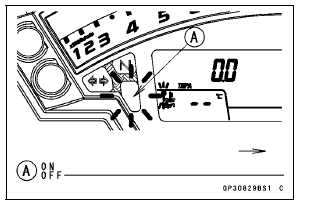
- Turn the ignition switch to OFF and wait for period more than 15 seconds.
- The registration mode automatically ends.
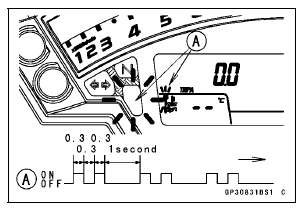
- Warning indicator light (Red LED) [A] goes off.
NOTE
- Turn the ignition switch to ON with the registered ignition key.
- Check that the engine can be started using all registered ignition keys.
All Keys Initial Registration Flow Chart
Test yourself
A quick Kawasaki Ninja ZX-10R quiz: every answer comes with an explanation and a link to the manual page.