Smart Key Functions
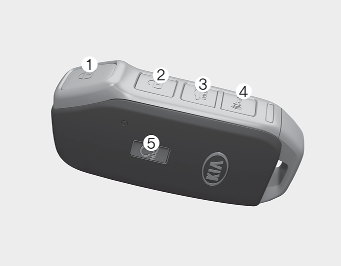
1. Door Lock
2. Door Unlock
3. Trunk Open
4. Panic Alarm
5. Remote Start
With the smart key, you can lock or unlock the doors (and trunk) and start the engine without inserting the key. Refer to the following for more details.
Locking
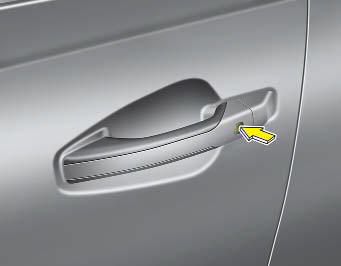
To lock the vehicle using the door handle button or the Smart Key:
1. Make sure that all doors, the hood, and the trunk are closed.
2. Make sure you have the Smart Key with you.
3. Press either the button on the front outside door handle or the door lock button (1) on the smart key. The horn will sound once and the hazard warning lights will flash to indicate that all doors are locked.
4. Make sure the doors are locked by checking the door lock button position inside the vehicle or by pulling the outside door handle.
✽ NOTICE
The door handle button will only work when the smart key is within 28~40 in. (0.7~1 m) of the outside door handle.
In some cases, when the outside door button is pressed, the doors will not lock and the horn will sound for 3 seconds with any of the following:
- The smart key is inside the vehicle.
- The ENGINE START/STOP button is in the ACC or ON position.
- Any door other than the trunk is open.
Unlocking
To unlock the vehicle:
1. Make sure you have the Smart Key with you.
2. Press either the button on the front (or front passenger door) handle or the door unlock button (2) on the driver's smart key. The driver's door will unlock. The hazard warning lights will flash twice to indicate that the driver's door is unlocked.
When the two-press unlock function is activated,
- Press any button on the front outside door handle or the door unlock button (2) on the smart key. The driver's door will unlock.
- Press any button on the front outside door handle or the door unlock button (2) on the smart key within four seconds. All doors will then unlock.
You can activate or deactivate the two-press unlock function by selecting "Settings → Vehicle → Door → 2 Press Unlock" on the infotainment system screen.
For more details, please scan the QR code in the separately supplied Vehicle Infotainment System Quick Reference Guide.
✽ NOTICE
- The door handle buttons will only work when the smart key is within 28-40 in. (0.7~1 m) of the outside door handle.
- Either the driver or front passenger door can be opened with the door handle button when the smart key is within this range.
- If you press the front passenger outside door handle with the smart key in your possession, all doors will unlock.
Opening the Trunk
To open:
1. Make sure you have the Smart Key with you.
2. Either press the switch inside the trunk emblem or press and hold the trunk unlock button (3) on the smart key for more than one second.
3. After the trunk is opened and then closed, the trunk locks automatically.
✽ NOTICE
The trunk unlock function will only work when the smart key is within 28-40 in. (0.7~1 m) of the trunk.
Panic Alarm
Press and hold the panic alarm button (4) for more than one second. The horn and hazard warning lights will flash for 30 seconds. To cancel panic mode, press any button on the smart key.
Remote Start
You can start the vehicle using the remote start button (5) on the smart key.
To start the vehicle remotely:
- Lock the doors by pressing the door lock button (1) within 32 ft. (10 m) of the vehicle.
- Press and hold the remote start button (5) for more than 2 seconds within 4 seconds after locking the doors.
Press the remote start button (5) once to turn off the vehicle.
The heating/cooling system maintains the condition until the vehicle is turned off. If no further operation or vehicle control is performed, the vehicle will turn off 10 minutes after remote start.
CAUTION
- The laws of your country may restrict the use of remote start. You must check the country's regulations before using this remote start system.
- The vehicle can only be started remotely when the shift lever is in P (Park).
- If the hood or trunk is open, you cannot start the vehicle remotely.
Starting
You can start the engine without inserting the key.
Test yourself
A quick Kia Cadenza VG Owner's Manual quiz: every answer comes with an explanation and a link to the manual page.