Power Windows
The Engine Start/Stop button must be in the ON position for the power windows to operate.
Each door has a power window switch that controls the window of that door. The driver has a window lock button that can disable the operation of the rear passenger windows.
The power windows can be used for approximately 30 seconds after the Engine Start/Stop button is placed in the ACC or LOCK position.
However, if either front door is opened, the power windows will not operate even within the 30 seconds.
The driver's door has a master window switch that controls all the windows in the vehicle.
If a window cannot be closed because it is blocked by an object, remove the object and close the window.
✽ NOTICE
When driving with the rear windows or the sunroof (if equipped) open or partially open, your vehicle may exhibit wind buffeting or a pulsating noise. This noise is normal and can be reduced or eliminated by taking the following actions. If the noise occurs with one or both rear windows down, partially lower both front windows about 2.5 cm (1 in.). If you feel the noise with the sunroof open, slightly reduce the sunroof opening.
CAUTION
Do not install any accessories in the vehicle that protrude into the open window area. Such objects will interfere with the proper operation of the automatic reverse "anti-pinch" protection described in this chapter.
Opening and Closing the Window
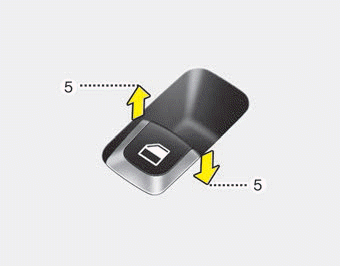
The driver's door has a master window switch that controls all the windows in the vehicle.
To open or close the window, press or pull up the front of the corresponding window switch to the first detent (5).
WARNING - Power Windows
Do not put your face or hands outside the window opening while the vehicle is moving. This may result in serious injury.
Automatic Up/Down Windows (Driver and Front Passenger)
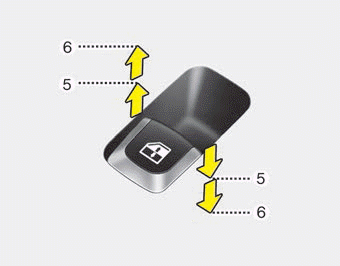
Briefly press or pull up the power window switch to the second detent position (6) to fully lower or raise the window even after the switch is released. To stop the window at a desired position during operation, pull up or press down and release the switch.
If the power window does not operate normally, the automatic power window system must be reset as follows:
1. Press the Engine Start/Stop button twice to place it in the ON position.
2. Close the driver and front passenger windows, and continue to pull the driver's power window switch up for at least 1 second after the glass is fully closed.
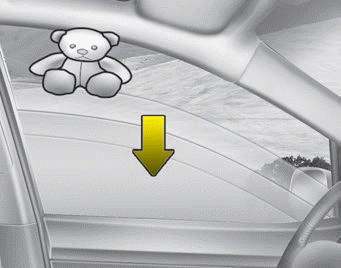
Automatic Reverse (for Automatic Up/Down Windows)
If upward movement of the window is blocked by an object or part of the body, the window will detect the resistance and stop moving up. The window will then lower approximately 30 cm (11.8 in.) so the object can be removed.
The distance may vary depending on the size or position of the window. If the window detects resistance while the power window switch is continuously held up, the window will stop moving up and then lower approximately 2.5 cm (1 in.).
If the power window switch is continuously pulled up again within 5 seconds after the window has been lowered by the automatic reverse function, the automatic reverse function will not operate.
The automatic reverse function for the driver and front passenger windows is active only when the "automatic" up function is used by fully pulling the switch up. The automatic reverse function will not operate if the window is raised to a half-up position using the window switch.
WARNING
Always check for obstructions before raising any window to avoid injury or damage to the vehicle. If an object less than 4 mm (0.16 inch) in diameter is caught between the window glass and the upper window frame, the auto-reverse function may not detect resistance and will not stop or reverse direction.
WARNING
The auto reverse function is not activated when the power window system is reset. Before closing the windows, make sure body parts or other objects are clear of the windows to avoid injury or vehicle damage.
WARNING
Do not install any accessories in the vehicle that protrude into the open window area. Such objects may interfere with the automatic reverse function.
Power Window Lock Switch
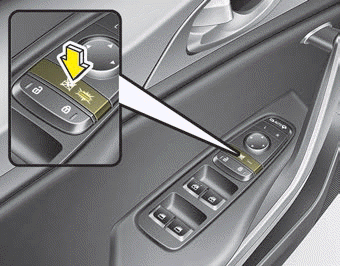
• The driver can disable the passenger door window switches by pressing the window lock button located on the driver's door to the LOCK (pressed) position.
• When the window lock button is pressed:
- The driver's main switch panel can operate all power windows.
- The front passenger switch panel can operate the front passenger window.
- The rear passenger switch panel cannot operate the rear passenger window.
CAUTION - Window Opening/Closing
To avoid possible damage to the power window system, do not open or close two or more windows at the same time. This will also ensure the fuse life.
Always check twice that all hands, fingers, head and other obstructions are clear before closing the window.
WARNING - Power Windows
Do not allow children to play with the power windows. Keep the power window lock button (on the driver's door) in the LOCK position (pressed).
Test yourself
A quick Kia Stinger CK quiz: every answer comes with an explanation and a link to the manual page.