User Settings Mode
Description
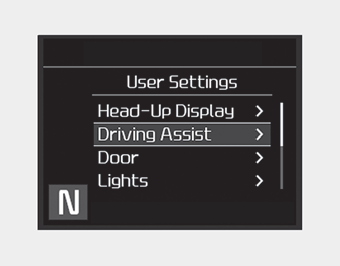
In this mode, you can change settings for the doors, lights, etc.
WARNING
Do not change the user settings while driving. You may lose control of the steering wheel, which may result in an accident and serious injury.
Shift to P to change settings
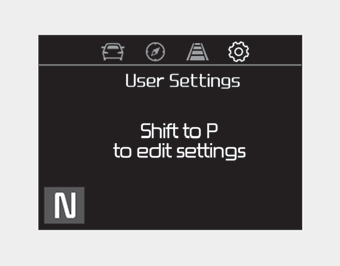
This warning message appears if you try to change the user settings while driving.
For safety, change the user settings after parking the vehicle by applying the parking brake and pressing the "P" (Park) button.
Head-Up Display (HUD)
- Head-Up Display On: If this item is checked, the head-up display (HUD) will be activated.
- Display Height: Adjust the height of the HUD image on the windshield.
- Rotation: Adjust the degree of rotation of the HUD.
- Brightness: Adjust the brightness level of the HUD.
- Content Selection
- Turn by Turn: If this item is checked, the Turn by Turn mode will be activated.
- Lane Keeping Assist: If this item is checked, LKA will be activated. - Speed Size: Small / Medium / Large
- Speed Color: White / Orange / Green
Driver Assist (if equipped)
• Smart Cruise Control with Stop & Go (if equipped):
- Select the sensitivity (Slow, Normal, Fast) of the Smart Cruise Control.
❈For more details, refer to "Smart Cruise Control with Stop&Go" in chapter 5.
• Driver Attention Warning: Select the warning timing (Off / Normal / Early) of the driver attention warning.
• Lane Keeping Assist (LKA, if equipped):
- Lane Departure Warning: Activates the lane departure warning function.
- Standard LKA: Activates the standard LKA mode.
- Active LKA: Activates the active LKA mode.
❈For more details, refer to "LKA (Lane Keeping Assist)" in chapter 5.
• Forward Collision-Avoidance Assist (FCA, if equipped):
- Activates or deactivates the FCA system.
❈For more details, refer to "Forward Collision-Avoidance Assist (FCA)" in chapter 5.
• Forward Collision Warning (FCW, if equipped)
- Select the sensitivity of the forward collision warning. (Late / Normal / Early)
❈For more details, refer to "Forward Collision-Avoidance Assist (FCA)" in chapter 5.
• Blind-Spot Collision Warning (if equipped)
- If this item is checked, the blind-spot collision warning function will be activated.
❈For more details, refer to "Blind-Spot Collision Warning" in chapter 5.
Blind-Spot Collision Warning Audible Alert (if equipped)
- If this item is checked, the blind-spot collision warning audible alert will be activated.
❈For more details, refer to "Blind-Spot Collision Warning" in chapter 5.
Door/Tailgate
• Auto Lock:
- Enable on Speed: All doors will automatically lock when the vehicle speed exceeds 15 km/h.
- Enable on Shift: All doors will automatically lock when the automatic transmission shift lever is moved from P (Park) to R (Reverse), N (Neutral), or D (Drive).
• Auto Unlock:
- Off: The automatic door unlock operation will be cancelled.
- Vehicle Off: All doors will automatically unlock when the engine is started/stopped. The button is set to OFF.
- Shift to P: All doors will automatically unlock when the automatic transmission shift lever is moved to the P (Park) position.
• Two-Press Unlock (if equipped): If this item is checked, the two-press unlock function will be activated. (Only the driver's door will unlock when the unlock button is pressed once, and all doors will unlock when the same button is pressed again within 4 seconds.)
• Power Liftgate (if equipped)
- If this item is checked, the power liftgate function will be activated.
❈For more details, refer to "Power Liftgate" in this chapter.
• Smart Liftgate (if equipped)
- If this item is checked, the smart liftgate function will be activated.
- If the power liftgate function is not activated, you cannot activate this function.
❈For more details, refer to "Smart Liftgate" in this chapter.
Lights
• One-Touch Turn Signal:
- Off: The one-touch turn signal function will be deactivated.
- 3, 5, 7 Blinks: The lane change signals will blink 3, 5, or 7 times when the turn signal lever is moved slightly.
❈For more details, refer to "Lights" in this chapter.
• Ambient Light Brightness: Adjust the brightness of the ambient lighting.
- Off / Level 1, 2, 3, 4
• Ambient Light Color: Select the color of the ambient lighting.
- White, Yellow, Red, Teal, Blue, Purple
• Headlamp Delay:
- If this item is checked, the headlamp delay function will be activated.
Sound
• Rear Parking Assist Warning Volume (if equipped):
- Adjust the volume of the parking assist warning. (Level 1 ~ 3)
❈For more details, refer to "Rear Parking Distance Warning" in this chapter.
• Welcome Sound (if equipped):
- If this item is checked, the welcome sound function will be activated.
Convenience
• Easy access seat (if equipped)
- Off: The easy access seat function will be disabled.
- Normal/Extended: When the engine is switched off, the driver's seat automatically moves backward to make it easier to get in and out of the vehicle. If you change the Engine Start/Stop button from the OFF position to ACC, the driver's seat will return to its original position.
❈For more details, refer to "Driver's Position Memory System" in Chapter 3.
• Easy access steering wheel (if equipped)
- On (checked): The steering wheel automatically moves up to the upper part of the steering column when you exit the vehicle, and returns to the last saved position when you enter the vehicle, so that the driver can get in and out of the vehicle comfortably.
- Off (unchecked): The easy access steering wheel function will be disabled.
❈For more details, refer to "Driver's Position Memory System" in Chapter 3.
• Welcome mirror/light (if equipped):
- If this item is checked, the Welcome Mirror/Light function will be activated.
• Wiper/light display (if equipped): If this item is checked, the Wiper/Light display will be activated.
• Gear position pop-up (if equipped): If this item is checked, the gear position pop-up will be activated.
• Icy road warning (if equipped): If this item is checked, the icy road warning display will be activated.
Service Interval
• Service Interval
To activate or deactivate the service interval function.
• Set Interval
Set the service interval by mileage and period.
• Reset
Resets the service interval function.
Other Features
• Fuel Economy Auto Reset
- Off: The average fuel economy is not reset automatically when refueling.
- After ignition: The average fuel economy is reset automatically whenever 4 hours have passed after the engine is switched off.
- After refueling: The average fuel economy is reset automatically when refueling.
❈For more details, refer to "Trip Computer" in this chapter.
• Fuel Economy Unit
- Select the fuel economy unit. (L/100 km, US mpg, UK mpg)
• Temperature Unit
- Select the temperature unit. (°C, °F)
• Tire pressure unit (if equipped)
- Select the tire pressure unit. (psi, kPa, bar)
• Torque unit (if equipped)
- Select the torque unit. (N·m, lb·ft)
Language
Select Language
Reset
You can reset the menu in the User Settings mode. All menus in the User Settings mode will be initialized, except the language and service interval.
Test yourself
A quick Kia Stinger CK quiz: every answer comes with an explanation and a link to the manual page.