Battery Replacement
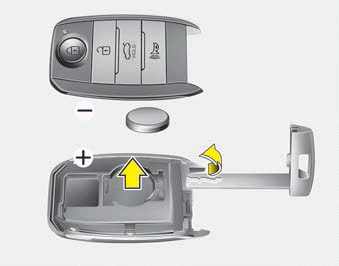
The smart key battery should last for several years. If the smart key does not operate normally, try replacing the battery with a new one. If you are not sure how to use the smart key or replace the battery, contact an authorized Kia dealer.
1. Remove the mechanical key.
2. Pry off the back cover.
3. Replace the battery with a new one (CR2032). When replacing the battery, make sure the battery is installed in the correct position.
4. Install the battery in the reverse order of removal.
- However, the smart key is designed to provide many years of trouble-free operation. It may fail due to exposure to moisture or static electricity. If you do not know how to use or replace the battery, contact an authorized Kia dealer.
- Using an incorrect battery may cause the electronic key to malfunction. Be sure to use the correct battery.
- To avoid damaging the Smart Key, do not drop it, get it wet, or expose it to heat or direct sunlight.
 Improper disposal of the battery may harm the environment and human health. Dispose of the battery in accordance with your local laws or regulations.
CAUTION! Smart Key Damage
Do not drop, get wet, or expose the smart key to heat or sunlight, otherwise it may be damaged.
WARNING
This device complies with Industry Canada license-exempt RSS standard(s).
Operation is subject to the following two conditions: (1) this device may not cause interference, and (2) this device must accept any interference, including interference that may cause undesired operation of the device.
Test yourself
A quick Kia Optima DL3 quiz: every answer comes with an explanation and a link to the manual page.