Side Impact Sensor (SIS)
Description and Operation
Description
The Side Impact Sensor (SIS) system consists of two types of side impact sensors. The G-SIS sensors are installed in the center of each front door module (left and right), and two rear sensors are installed in the rear pillars (left and right).
The front side impact sensor is also called P-SIS because it detects pressure caused by a collision at its installation location.
The rear side impact sensor is also called A-SIS because it detects acceleration caused by a collision at its installation location.
The SRSCM determines airbag deployment and deployment timing through the SIS collision signal when a collision occurs.
Components and Component Location
Component Location
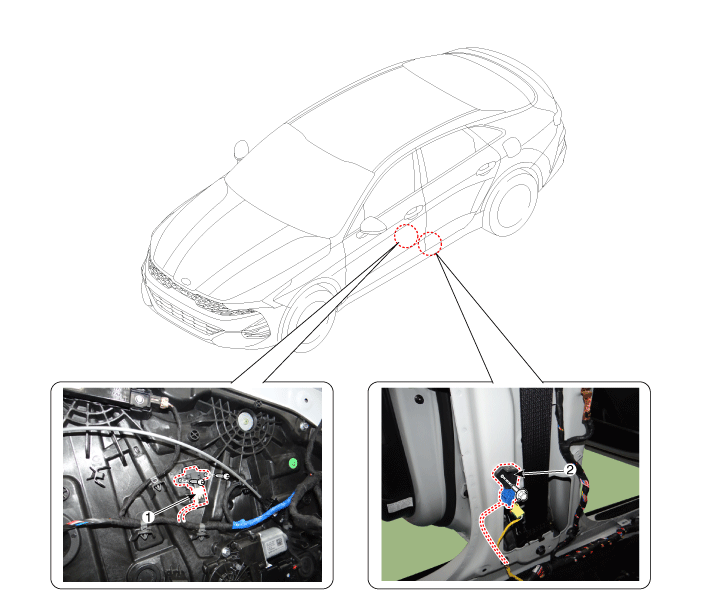
| 1. Pressure Side Impact Sensor | 2. Gravity Side Impact Sensor |
Repair Procedures
Removal
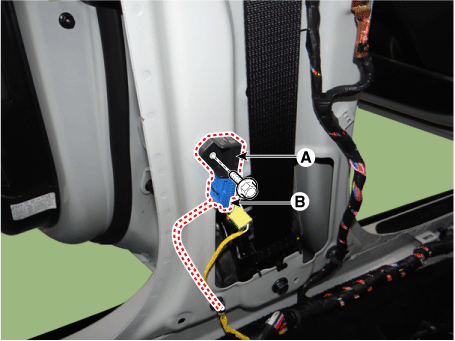
Gravity Side Impact Sensor (G-SIS)
Disconnect the negative battery cable.
Remove the center pillar trim.
(Refer to Body - "Center Pillar Trim")
Remove the Gravity Side Impact Sensor (A) by loosening the bolt, then disconnecting the connector (B).
Tightening torque:
6.9–11.8 N·m (0.7–0.8 kgf·m, 5.0–5.8 ft-lbf, 60.8–69.4 in-lbf)
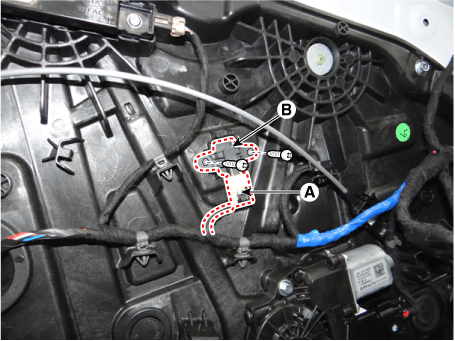
Pressure Side Impact Sensor (P-SIS)
Disconnect the negative battery cable.
Remove the front door trim panel.
(Refer to Body - "Front Door Trim Panel")
Disconnect the connector (A) and turn the pressure side impact sensor (B) counterclockwise to remove it.
Tightening torque:
2.0–2.9 N·m (0.2–0.3 kgf·m, 1.4–2.2 ft-lbf, 17.4–26.0 in-lbf)
Installation
Pressure Side Impact Sensor [P-SIS (Door)]
Install a new front side impact sensor with the screws, then connect the front side impact sensor connector.
Tightening torque:
6.9–11.8 N·m (0.7–0.8 kgf·m, 5.0–5.8 ft-lbf, 60.8–69.4 in-lbf)
Install the front door trim panel.
(Refer to Body - "Front Door Trim Panel")
Connect the negative battery cable.
After installing the front side impact sensor, verify that the system operates correctly:
Turn the ignition ON; the SRS indicator should illuminate for about six seconds, then go off.
Gravity Side Impact Sensor [G-SIS (Center Pillar)]
Install the side impact sensor with the bolt, then connect the side impact sensor connector.
Tightening torque:
2.0–2.9 N·m (0.2–0.3 kgf·m, 1.4–2.2 ft-lbf, 17.4–26.0 in-lbf)
Install the center pillar trim.
(Refer to Body - "Center Pillar Trim")
Connect the negative battery cable.
After installing the side impact sensor, check that the system operates properly.
Turn the ignition ON; the SRS indicator should illuminate for about six seconds, then go off.
Test yourself
A quick Kia Optima DL3 quiz: every answer comes with an explanation and a link to the manual page.