Vehicle Specifications
Parking Distance Warning Operation
In this manual: Vehicle Specifications
~2min read
Operating Condition
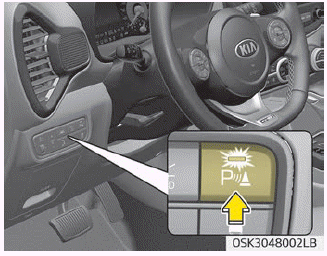
- This system is activated when the Parking Distance Warning button is pressed with the ignition switched on.
- The Parking Distance Warning button indicator illuminates automatically and activates the Parking Distance Warning system when you shift into R (Reverse). It turns off automatically when you drive faster than 20 km/h.
- The detection distance when reversing is approximately 120 cm (47 in.) when you drive slower than 10 km/h.
- The warning activation distance when driving forward is approximately 100 cm (39 in.) when you drive slower than 10 km/h.
- When more than two objects are detected at the same time, the nearest objects will be recognized first.
- The external sensors activate when you shift into the R (Reverse) position.
- If the vehicle speed exceeds 10 km/h, the system will not activate, and the Parking Distance Warning system is deactivated when you drive faster than 20 km/h (12 mph). To activate the system again, press the Parking Distance Warning button.
NOTICE
It may not operate if the distance to an object is already less than approximately 25 cm when the system is turned on.
Type of Warning Indicator and Sound
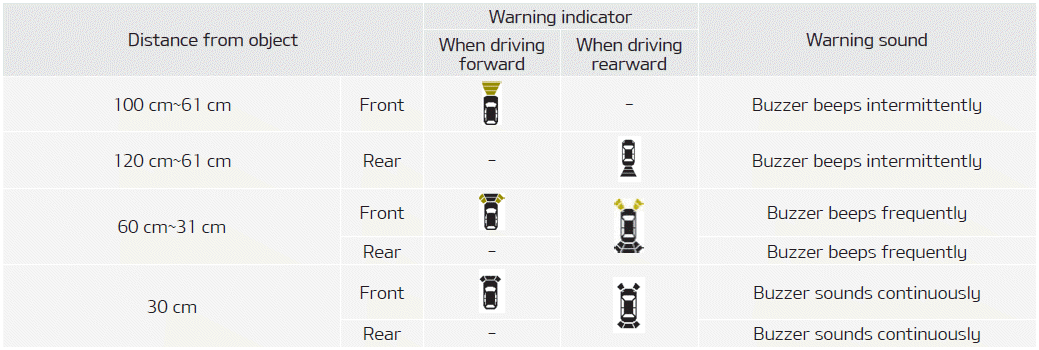
NOTICE
- The actual warning sound and indicator may differ from those shown in the illustration depending on the objects or sensor condition.
- Do not wash the vehicle sensor with high-pressure water.
CAUTION
- This system can only detect objects within the range and location of the sensors; it cannot detect objects in other areas where sensors are not installed. In addition, small or thin objects, such as poles or objects located between the sensors, may not be detected. Always visually check behind the vehicle when reversing.
- Be sure to inform all drivers of the vehicle who may be unfamiliar with the system about the system's capabilities and limitations.
Test yourself
A quick Kia Soul Owner's Manual quiz: every answer comes with an explanation and a link to the manual page.
Was this page helpful?