Driver's Side Power Window Operation
Manual Opening/Closing
To lower the window to the desired position, lightly press the window switch.
To raise the window to the desired position, lightly pull the switch.
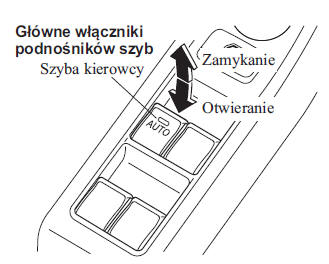
Automatic Opening/Closing
To lower the window fully automatically, press the switch all the way down, then release it. The window will open fully automatically.
To raise the window fully automatically, pull the switch all the way up, then release it. The window will close fully automatically.
To stop the window at the desired position, pull or press the switch in the direction opposite to the window movement, then release it.
Power Window Initialization Procedure
If the battery is disconnected during vehicle service, or another condition occurs (such as holding the switch after the window is fully lowered or raised), the window will not fully close and open automatically.
Automatic operation will be restored only for the window whose function has been initialized.
1. Turn the ignition switch to the ON position.
2. Make sure the power window lock switch on the driver's door is not engaged.
3. Press the window switch and fully lower the window.
4. Pull the switch to raise the window, and hold it for about 2 seconds after the window is fully closed.
Anti-Pinch Function
If a hand, the passenger's head or another object blocks the window from closing during automatic closing, the window will stop and lower to the halfway position.
WARNING
Make sure nothing blocks the window when it reaches the fully closed position or when you hold the raised window switch: Blocking the window when it reaches the fully closed position or while holding the raised switch is a safety hazard.
In this case the safety function will not stop the window from rising. If fingers are caught, serious injury may occur.
CAUTION
Depending on driving conditions, window closing will be stopped and the window will start to open when the regulator detects a shock similar to that caused by a blocked window.
If the anti-pinch function has activated and the windows cannot close automatically, pull and hold the switch until the window is fully closed.
The anti-pinch function does not work until the system settings are initialized.
Power Window Operation After Engine Shutdown
The power windows remain operational for up to about 40 seconds after the ignition switch is turned from ON to OFF, as long as all doors are closed. If any door is opened, the power windows will not operate.
CAUTION
After the engine is turned off, the automatic window closing function is not active. To close the window, raise and hold the window switch.
Test yourself
A quick Mazda 2 quiz: every answer comes with an explanation and a link to the manual page.