Power Window
The ignition switch must be in the ON position for the power windows to operate.
WARNING
Make sure nothing is in the path of a window you want to close:
Closing the windows using the power window is dangerous.
A person's hands, head, or even neck may be caught by the window, resulting in serious injury or death. This warning applies especially to children.
Never allow children to play with the power window switches:
Power window switches that are not locked using the power window lock switch allow children to operate the power windows accidentally, which may cause serious injury if a child's hands, head, or neck are caught by a window.
WARNING
To prevent blowing the fuse and damaging the power window system, do not open or close more than three windows at the same time.
Power Window Operation (Type A)
NOTE
- Each passenger window can be opened and closed using the switch on the door when the power window lock switch on the driver's door is in the unlocked position (page 3-39).
- Each passenger window can also be operated using the master control switches on the driver's door.
Master Control Switches
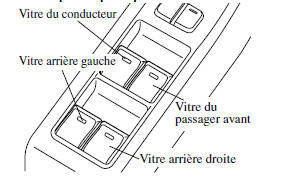
Normal Open/Close
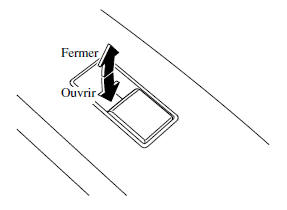
To open the window to the desired position, lightly press the switch.
To close the window to the desired position, lightly pull the switch.
Master Control Switches
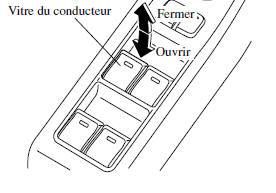
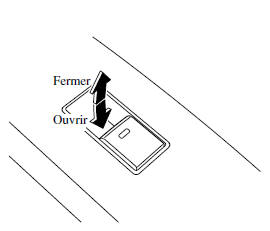
Automatic up/down operation
To fully open the window automatically, press the switch all the way down.
To fully close the window automatically, pull the switch all the way up.
To stop the window before it has fully opened or closed, pull or press the switch in the direction opposite to the window's movement, then release it.
Power window system initialization procedure
If the battery was disconnected during vehicle maintenance, or for other reasons such as continued operation of a switch after the window has been fully opened/closed, the window will not open or close fully automatically.
The automatic function can be reset using the master switches or the passenger door switches.
The automatic power window reset procedure can be performed from any door switch. The automatic power window function will only be restored for the power window that has been reset.
- Turn the ignition switch to ON.
- Make sure the power window lockout switch on the driver's door is not pressed.
- Press the switch and fully open the window.
- Pull the switch to fully close the window and hold it for about 2 seconds after the window is fully closed.
- Repeat steps 3-4 for the front passenger power window while seated in the front passenger seat.
- Repeat steps 3-4 for the rear left and rear right power windows while passengers are seated in the rear seats.
- Make sure the power windows operate correctly using the door switches.
After the system has been reset, each passenger-side window can be fully opened or closed automatically using the master control switches.
Window safety function
If a hand, a person's head or another object blocks the window while it is closing automatically or manually, the window stops and opens halfway.
WARNING
Make sure nothing is blocking the power window just before it reaches the fully closed position, or while the power window switch is held fully up:
Blocking a power window just before it reaches the fully closed position, or while the power window switch is held fully up, is dangerous.
In these cases, the safety function cannot prevent the window from closing fully. If fingers are caught, serious injury may result.
NOTE
- Depending on driving conditions, a window closing automatically may stop and begin to open if the device senses a shock similar to an object blocking it. If the safety function activates and the power window cannot be closed automatically, pull and hold the switch fully up and the window will close.
- The window safety function only works once the system has been reset.
Power window operation with the engine off
The power windows can be operated for up to about 40 seconds after the ignition is turned from ON to OFF with all doors closed. If either front door is opened, the power windows will no longer operate.
NOTE
When operating the windows with the engine off, the switch must be held firmly until the window is closed, because the automatic closing function will not operate.
Driver's side power window operation (Type B)
Normal Open/Close
To open the window to the desired position, lightly press the switch.
To close the window to the desired position, lightly pull the switch.
Master Control Switches
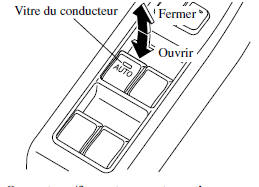
Automatic up/down operation
To fully open the window automatically, press the switch all the way down, then release it. The window will then open automatically.
To fully close the window automatically, pull the switch all the way up, then release it. The window will then close automatically.
To stop the window before it has fully opened or closed, pull or press the switch in the direction opposite to the window's movement, then release it.
Power window system initialization procedure
If the battery was disconnected during vehicle maintenance, or for other reasons such as continued operation of a switch after the window has been fully opened/closed, the window will not open or close fully automatically.
The automatic power window function will only be restored for the power window that has been reset.
- Turn the ignition switch to ON.
- Make sure the power window lockout switch on the driver's door is not pressed.
- Press the switch and fully open the window.
- Pull the switch to fully close the window and hold it for about 2 seconds after the window is fully closed.
Window safety function
If a hand, a person's head or another object blocks the window while it is closing automatically, the window will stop and open halfway.
WARNING
Make sure nothing is blocking the power window just before it reaches the fully closed position, or while the power window switch is held up:
Blocking a power window just before it reaches the fully closed position, or while the power window switch is held up, is dangerous.
In these cases, the safety function cannot prevent the window from closing fully. If fingers are caught, serious injury may result.
NOTE
- Depending on driving conditions, a window closing automatically may stop and begin to open if the device senses a shock similar to an object blocking it. If the safety device activates and the window cannot be closed automatically, pull and hold the switch and the window will close.
- The window safety function only works once the system has been reset.
Power window operation with the engine off
The power windows can be operated for up to about 40 seconds after the ignition is turned from ON to OFF with all doors closed. If either front door is opened, the power windows will no longer operate.
NOTE
When operating the windows with the engine off, the switch must be held firmly until the window is closed, because the automatic closing function will not operate.
Passenger side power window operation (Type B)
The passenger power windows can be operated when the power window lockout switch on the driver's door is in the unlocked position.
The passenger windows can be opened or closed using the master switches on the driver's door.
Master Control Switches
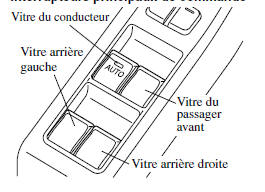
To open the window to the desired position, press the switch.
To close the window to the desired position, pull the switch.
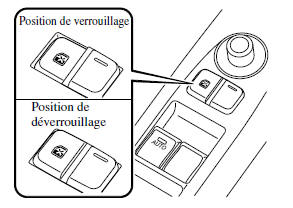
Power Window Lock Switch
This feature prevents all power windows from operating except the driver's window. Keep this switch in the locked position while children are in the vehicle.
Locked position (button pressed in): Only the driver can operate their power window.
Unlocked position (button not pressed in): All power windows on every door can be operated.
Test yourself
A quick Mazda 6 quiz: every answer comes with an explanation and a link to the manual page.