Obd drive mode
- Performing the Drive Mode inspects the OBD system for proper operation. The Drive Mode must be performed to ensure that no additional DTCs are present.
- During Drive Mode, the following systems are inspected:
Caution- Oxygen sensor (HO2S)
- Oxygen sensor heater
- Catalytic converter (TWC)
- While performing the Drive Mode, always operate the vehicle in a safe and lawful manner.
- When the WDS or equivalent is used to observe monitor system condition while driving, be sure to have another technician with you, or record the data in the WDS or equivalent using the PID/DATA MONITOR AND RECORD function and inspect later.
- Vehicle speed and engine speed detected by the PCM may differ from that indicated by the speedometer and tachometer. Use the WDS or equivalent to monitor vehicle speed.
- If the OBD system inspection is not completed during the Drive Mode, the following causes are considered:
1. The OBD system detects the malfunction. 2. The Drive Mode procedure is not completed correctly.
- Disconnecting the battery will reset the memory. Do not disconnect the battery during and after Drive Mode.
- The WDS or equivalent can be used at anytime through the course of Drive Mode to monitor the completion condition. Monitoring can be done by viewing the ON-BOARD SYSTEM READINESS menu.
- The PCM adaptive memory condition can be confirmed with RFCFLAG PID.
- If RFCFLAG PID is ON, PCM Adaptive Memory Procedure Drive Mode is not necessary, because PCM already has adaptive memory.
- If RFCFLAG PID is OFF, PCM Adaptive Memory Procedure Drive should be performed before HO2S Heater, HO2S, and TWC Repair Verification Drive Mode.
1. Start the engine and warm it up completely.
2. Verify all accessory loads (A/C, headlights, blower fan, rear window defroster) are off.
3. Perform no load racing at the engine speed shown in the graph, then idle the engine for more than 30 safter the cooling fan is stopped. If possible, monitor RPM PID for engine speed and FAN1 PID for cooling fan condition during this procedure.
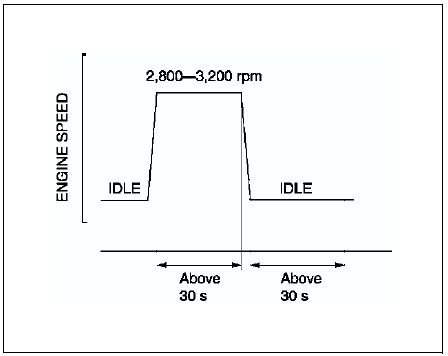
4. Turn ignition key off then on again.
5. Access to RFC FLAG PID to confirm PCM adaptive memory condition. If RFCFLAG PID is ON, PCM Adaptive Memory Procedure Drive is completed.
6. If RFCFLAGPID is still OFF, go back to Step 1.
HO2S Heater, HO2S, and TWC Repair Verification Drive Mode1. Access to RFCFLAG PID to confirm PCM adaptive memory condition. If RFCFLAG PID is OFF, perform PCM Adaptive Memory Procedure Drive first.
2. If RFCFLAG PID is ON, start the engine and warm it up completely.
3. Verify all accessory loads (A/C, headlights, blower fan, rear window defroster) are off.
4. Drive the vehicle as shown in the graph; first drive in zone O, then A or B, followed by C or D, finally E or F. Driving condition before the constant speed driving is not specified.
For MTX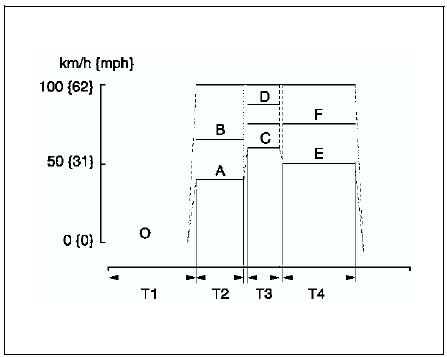
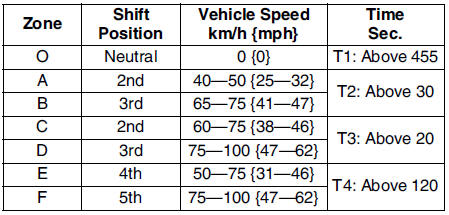
For ATX
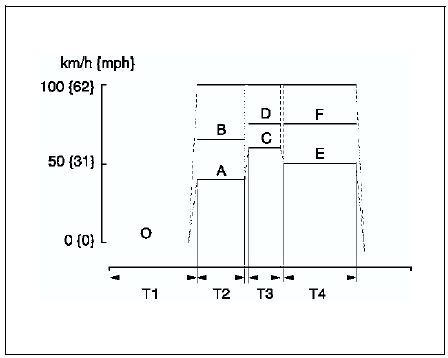
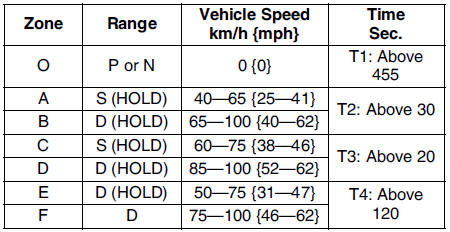
5. Stop vehicle and access to ON BOARD SYSTEM READINESS menu of GENERIC OBD FUNCTION to inspect the Drive Mode completion condition. If completed, RFC changes from NO to YES.
6. If not completed, turn the ignition key to OFF, then go back to Step 4.
7. Access DIAGNOSTIC MONITORING TEST RESULTS menu of GENERIC OBD FUNCTIONS to inspect the monitor results. If MEAS are not within the specification, repair has not completed.
8. Verify no DTC is available.
Test yourself
A quick Mazda 6 quiz: every answer comes with an explanation and a link to the manual page.