Speed limit assist
General notes
Speed limit assist shows the detected speed limits on the multifunction display. Data from the navigation system is also analysed for this purpose. When the system has detected a traffic sign indicating a speed limit or the end of a speed limit, a corresponding display appears on the multifunction display. If speed limit assist does not detect a traffic sign, it takes the speed limit from the digital map and shows it to you.
Speed limit assist detects traffic signs using a camera mounted at the top of the windshield, behind the mirror.
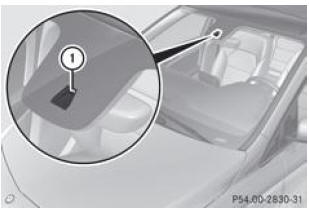
- Speed limit assist camera
Important safety notes
WARNINGSpeed limit assist is only an assistance system and may not always correctly detect all traffic signs indicating the maximum permitted speed.
The system may be impaired or may not function.
- when visibility is poor (in snowfall, rain or spray, for example)
- when dazzled by oncoming vehicles or by the sun, for example
- if the windshield in front of the camera is dirty, fogged up or covered by a sticker, for example
- if traffic signs are obscured (by dirt, snow or trees, for example)
- if traffic signs are not sufficiently illuminated
- when traffic signs are ambiguous (near roadworks or multi-lane roads, for example)
Traffic signs always take priority over speed limit assist. Speed limit assist cannot assess road or traffic conditions. It also cannot replace your attentiveness.
Always pay attention to traffic conditions and your immediate surroundings so that you can detect hazards in time. Otherwise, you could cause an accident and injure yourself or others.
Display on the multifunction display
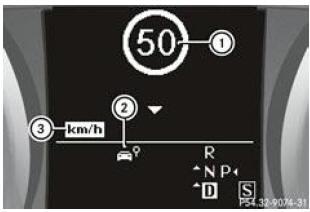
Vehicles with automatic transmission (example)
- Traffic sign indicating a speed limit or the end of a speed limit (example)
- The speed limit reminder is available and the warning function is activated in the on-board computer
- Unit of the displayed sign
Brief display of detected traffic signs on the multifunction display
- Activate the speed limit reminder warning function via the on-board computer.
Symbol 2 appears.
As soon as a traffic sign indicating a speed limit or the end of a speed limit 1 is detected, it appears on the multifunction display for approximately 5 seconds. During this time, other displays on the multifunction display are hidden.
Continuous display of detected traffic signs on the multifunction display
- Display the speed limit reminder via the on-board computer.
As soon as a traffic sign indicating a speed limit or the end of a speed limit 1 is detected, it appears on the multifunction display.
The traffic sign indicating a speed limit 1 generally remains displayed until
- a traffic sign indicating the end of the speed limit is detected
- you turn
- you enter or leave a built-up area
- the road type changes (motorway or rural road, for example)
- you have driven a minimum distance without the sign being detected again
Test yourself
A quick Mercedes-Benz B-Class quiz: every answer comes with an explanation and a link to the manual page.