Facial Recognition Check
Work Procedure
If system detects that driver is not facing forward even though driver is facing forward, perform face recognition check.
PREPARATION BEFORE FACE RECOGNITION CHECK
Make sure that all of the following conditions are satisfied
vehicle speed is 0 km/h.
Shift position is "P" range.
Put driver's head on the headrest.
Adjust seat so that eye position is the same as the inner rear end of assist grip.
Adjust steering position to the lowest position and the farthest position from driver.
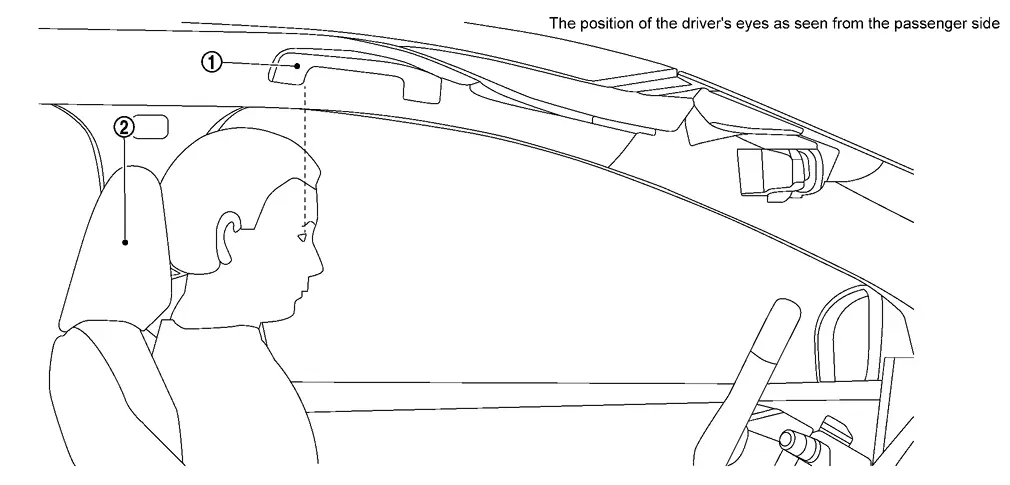
 |
Assist grip |  |
Head rest |
GO TO 2.
PERFORM FACE RECOGNITION CHECK
With CONSULT
Ignition switch is ON.
Select "Work Support" in "Driver Monitor Camera".
Select “FACIAL RECOGNITION CHECK”.
Touch “Start”.
Check the note displayed on CONSULT and touch “Next”.
Follow CONSULT screen to check face recognition.
Confirm each check result.
GO TO 3.
SAVE RESULT
With CONSULT
After completing all the work, touch "Screen Capture" to save the screen.
After saving the screen, touch "Save" to save the log information.
WORK END