RENAULT card: battery
Replacing the battery
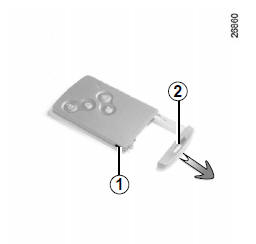
When the message "Card battery low" appears on the instrument panel, replace the RENAULT card battery: press button 1 while pulling out the emergency key 2, then unclip cover 3 using tab 4.
Remove the battery by pressing down on one side (movement A) and lifting on the other (movement B), then replace it, observing the polarity and the model printed inside cover 3.
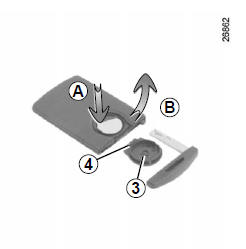
To refit, proceed in reverse order, then press one of the card's buttons four times near the vehicle: the message disappears at the next start.
Note: when replacing the battery, do not touch the electronic circuit and contacts inside the RENAULT card.
Make sure the cover is securely clipped.
Batteries are available from a Brand Representative; their service life is about two years. Make sure there is no ink on the battery, as this could cause a poor electrical contact.
Malfunction
If the battery is too weak to operate the card, you can still start the vehicle (insert the RENAULT card into the card reader) and lock/unlock the vehicle (refer to the "Locking and unlocking the openings" section in chapter 1).
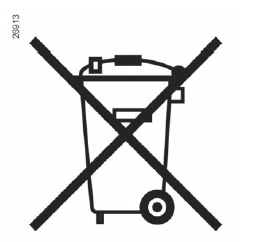
Do not dispose of used batteries in the environment; hand them in to a body responsible for battery collection and recycling.
Test yourself
A quick Renault Captur quiz: every answer comes with an explanation and a link to the manual page.