Listening to an iPod
Connecting an iPod allows you to listen to music directly through the vehicle speakers. Press the "MODE" button until "iPod" is displayed.
Connecting an iPod
Control panel
Type A
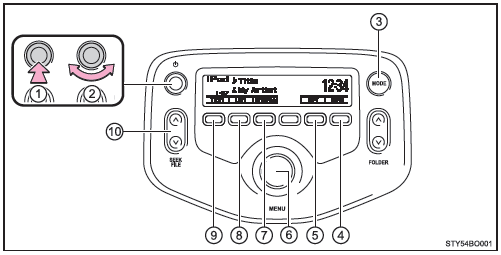
- Power
- Volume
- Changing the audio source/playback
- Random or back button
- Repeat
- Selecting an iPod menu/song or selecting items
- iPod menu mode, playback
- Displaying the song list
- Displaying a text message
- Selecting a song, fast-forwarding or rewinding
Type B
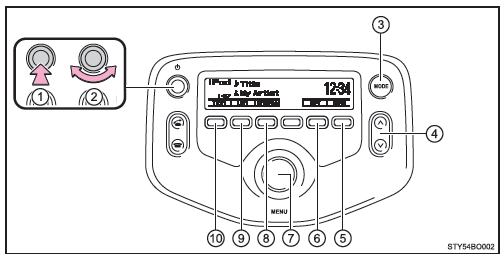
- Power
- Volume
- Changing the audio source/playback
- Selecting a song, fast-forwarding or rewinding
- Random or back button
- Repeat
- Selecting an iPod menu/song or selecting items
- iPod menu mode, playback
- Displaying the song list
- Displaying a text message
Selecting a playback mode
- Press
 (Browse) to select iPod menu mode.
- Turning the "MENU" knob clockwise changes the playback mode in the following order: "Playlists" → "Artists" → "Albums" → "Songs" → "Podcasts" → "Genres" → "Composers" → "Audiobooks"
- Press the knob to select the desired playback mode.
■ Playback mode list
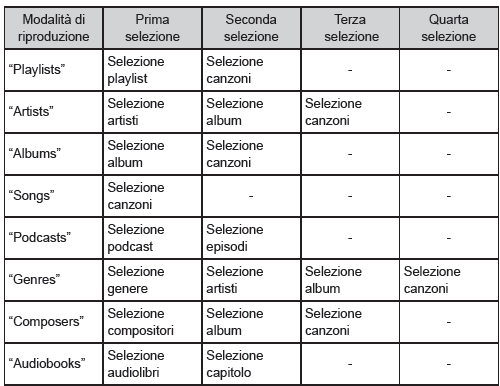
■ Selecting a list
- Turn the "MENU" knob to display the first selection list.
- Press the knob to select the desired item and display the second selection list.
- Repeat the same procedure to select the desired item.
To return to the previous selection list, press (Back).
 (Play) to play the desired selection.
Selecting songs
Turn the "MENU" knob or press the "Ù" or "Ú" symbol on the "SEEK/FILE" button (type A) or the "Ù" or "Ú" button (type B) to select the desired song.
Selecting a song from the song list
- Press
 (List).
The song list will be displayed.
 (Back).
Fast-forwarding and rewinding songs
Press and hold the symbol " " o "
 " on the "SEEK/FILE" button (type A) or the "
 " o "
 " button (type B).
Repeat
Press (RPT) key.
To cancel, press the button again.
Random playback
Pressing (RDM) changes the modes in the following order: Random track → Random album → Off
Changing the display
Press (Text) to show or hide the album title.
If there is text that is not displayed, the symbol appears. .
Press and hold the button to display the remaining text.
■ About the iPod
- "Made for iPod" and "Made for iPhone" mean that an electronic accessory has been designed to connect specifically to iPod or iPhone, respectively, and has been certified by the manufacturer to meet Apple performance standards.
- Apple is not responsible for the operation of this device or its compliance with safety and regulatory standards. Please note that using this accessory with an iPod or iPhone may affect wireless performance.
- iPhone, iPod, iPod classic, iPod nano and iPod touch are trademarks of Apple Inc., registered in the U.S. and other countries.
■ iPod functions
- When an iPod is connected and the audio source is set to iPod mode, the iPod will resume playback from where it was last stopped.
- Depending on the type of iPod connected to the system, some functions may not be available. Certain malfunctions may be resolved by disconnecting and reconnecting the device.
- While connected to the system, the iPod cannot be operated using its own controls. You must use the vehicle audio system controls instead.
■ iPod problems To resolve most problems that occur while using the iPod, disconnect the iPod from the vehicle iPod connection and reset it.
For instructions on how to reset the iPod, refer to your iPod's owner's manual.
■ Display Depending on the recorded content, characters may not be displayed correctly or may not be displayed at all.
■ Error messages If an error message is displayed, refer to the following table and take the appropriate action. If the problem is not resolved, contact any Toyota authorized dealer or repairer, or another suitably qualified and equipped professional.
| Message | Cause/Corrective action |
| "iPod ERROR" | Indicates that data cannot be read from the iPod. |
| "ERROR 3" | Indicates that the iPod may be malfunctioning. |
| "ERROR 4" | Indicates that an overvoltage has occurred. |
| "ERROR 5" | Indicates that a communication error has occurred with the iPod. |
| "ERROR 6" | Indicates that an authentication error has occurred. |
| "NO SONGS" | Indicates that there is no music data on the iPod. |
| "NO PLAYLIST" | Indicates that some of the available songs were not found in the selected playlist. |
| "UPDATE YOUR iPod" | Indicates that the iPod version is not compatible. |
■ Compatible models
The following iPod®, iPod nano®, iPod classic®, iPod touch® and iPhone® devices can be used with this system.
- Designed for
- iPod touch (5th generation)
- iPod touch (4th generation)
- iPod touch (3rd generation)
- iPod touch (2nd generation)
- iPod touch (1st generation)
- iPod classic
- iPod with video
- iPod nano (7th generation)
- iPod nano (6th generation)
- iPod nano (5th generation)
- iPod nano (4th generation)
- iPod nano (3rd generation)
- iPod nano (2nd generation)
- iPod nano (1st generation)
- iPhone 5
- iPhone 4S
- iPhone 4
- iPhone 3GS
- iPhone 3G
- iPhone
Depending on differences in model or software version, etc., some models may not be compatible with this system.
Standards and limitations are as follows:
- Maximum number of playlists per device: 9999
- Maximum number of songs per device: 65535
- Maximum number of songs per playlist: 65535
WARNING
■ While driving Do not connect an iPod or operate the controls. Doing so may cause an accident resulting in serious or fatal injury.
NOTE
■ To prevent damage to the iPod or connection terminal
- Do not leave an iPod in the vehicle. The interior temperature may rise significantly.
- Do not push down on the iPod or apply unnecessary pressure while it is connected.
- Do not insert inappropriate objects into the port.
Test yourself
A quick Toyota Aygo quiz: every answer comes with an explanation and a link to the manual page.