Bluetooth Audio
Using a Bluetooth-compatible portable player
Type A
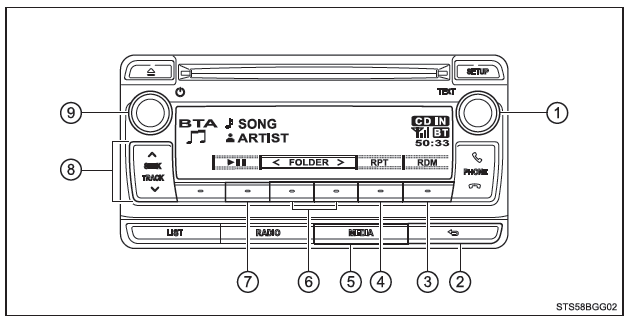
- Tune/scroll knob
Selecting a track or displaying a text message - BACK button
- Random playback
- Repeat playback
- Audio source selection/ playback
- Selecting an album
- Play/pause
- Selecting a track, fast forward or rewind
- Power/volume knob
Press: Turns the audio system on and off
Turn: Adjusts the volume
Type B
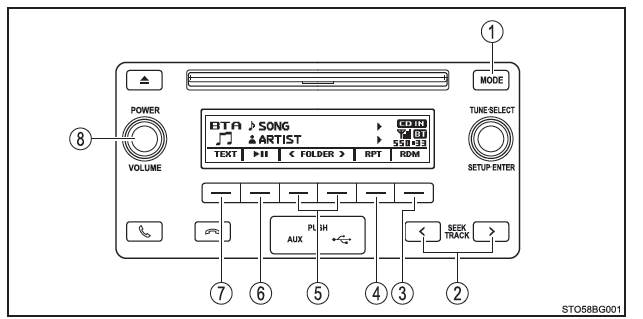
- Audio source selection/ playback
- Selecting a track, fast forward or rewind
- Random playback or return button
- Repeat playback
- Selecting an album
- Play/pause
- Displaying a text message
- Power/volume knob
Press: Turns the audio system on and off
Turn: Adjusts the volume
Selecting and scanning albums
■ Selecting an album Press ("<FOLDER") or
 ("FOLDER>") to select the desired album.
■ Scanning all albums by playing the first track (Type A only)
1. Press and hold the "SCAN" button until a beep confirms.
The system plays the first 10 seconds of the first track of each album.
2. When the desired album is found, press the button again.
Selecting and scanning tracks
■ Selecting a track Press or the "SEEK TRACK" button (Type A), or the
 or "SEEK TRACK" (Type B) to select the desired track.
■ Scanning an album by playing tracks (Type A only)
1. Press the "SCAN" button.
Each track is played for 10 seconds.
2. When the desired track is found, press the button again.
Fast forwarding and rewinding through tracks
Press and hold or to
 the "SEEK TRACK" button (Type A), or the button
 or "SEEK TRACK" (Type B).
Random playback
Press ("RDM") to cycle through the modes in this order: Random album→Random all tracks→Off.
Repeat playback
Press ("RPT") to cycle through the modes in this order: Repeat track→Repeat album→Off.
Playing and pausing tracks
Press ( ).
Selecting the display
Type A
Press the tune/scroll knob. The display shows the track title, artist name and album title.
To return to the previous screen, press the selector or the back button.
Type B
Press ("TEXT") to show or hide the album title.
If the text continues, is displayed.
Press and hold the button to display the rest of the text.
■ Bluetooth audio system functions Depending on the portable player connected to the system, some functions may not be available. ■ Display