Using the audio system
Optimizing the audio system
You can adjust the sound quality, balance and ASL settings.
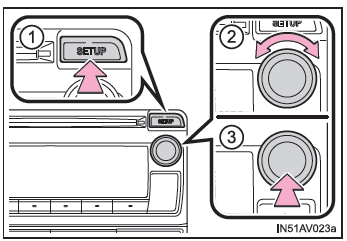
Type A
Type B
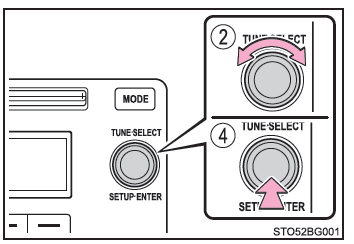
- Displays the "SETUP" menu
- Changes the following settings
- Sound Quality and Balance
You can adjust the sound quality and balance settings to achieve the best possible acoustics. - Automatic Volume Control (ASL)
- Sound Quality and Balance
- Mode Selection
- Displaying the "SETUP" Menu/Mode Selection
Using the Audio Control Function
■ Changing the Sound Quality Mode
1. Press the "SETUP" button (Type A), or the tune/scroll knob (Type B).
2. Turn the knob to select "Sound Setting".
Press the knob.
3. Turn the knob until the desired mode option is displayed.
You can select "BASS", "TREBLE", "FADER", "BALANCE", or "ASL".
4. Press the knob.
■ Adjusting the Sound Quality Turn the tune/scroll knob to adjust the level.
| Sound quality mode | Displayed mode | Level | Turn left | Turn right |
| Bass* | "BASS" | From -5 to 5 | Down | Up |
| Treble* | "TREBLE" | From -5 to 5 | ||
| Front/rear balance | "FADER" | From F7 to R7 | More rear | More front |
| Left/right balance | "BALANCE" | From L7 to R7 | More left | More right |
*: The sound level can be set individually for each audio mode.
Press the "SETUP" button or the back button (Type A), or the knob or ("BACK") (Type B) to return to the sound setting menu.
■ ASL (Automatic Volume Control) System Adjustment
Type A
When Automatic Volume Control is selected, turn the tune/scroll knob to the right to change the ASL level in the order LOW, MID, and HIGH.
Turning the knob to the left turns off Automatic Volume Control.
ASL automatically adjusts the volume and sound quality according to vehicle speed.
Type B
When Automatic Volume Control is selected, turn the tune/scroll knob to change the ASL effect level.
You can select "LOW", "MID", "HIGH", or "OFF".
ASL automatically adjusts the volume and sound quality according to vehicle speed.
Press the knob or ("BACK") (Type B), or the "SETUP" button or the back button (Type A) to return to the sound setting menu.