Using the Radio
Press the "RADIO" button (Type A) or the "MODE" button (Type B) until "AM" or "FM" is displayed.
Type A
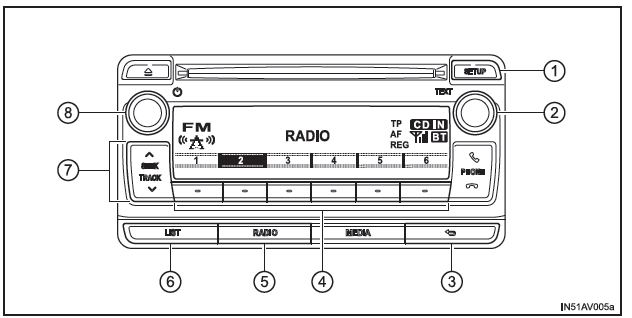
- AF Mode/Region Code/TA Setting
- Tune/scroll knob
Tunes the frequency or selects options - BACK button
- Station preset buttons
- AM/FM mode button
- Displaying the station list
- Frequency seek
- Power/volume knob
Press: Turns the audio system on and off
Turn: Adjusts the volume
Type B
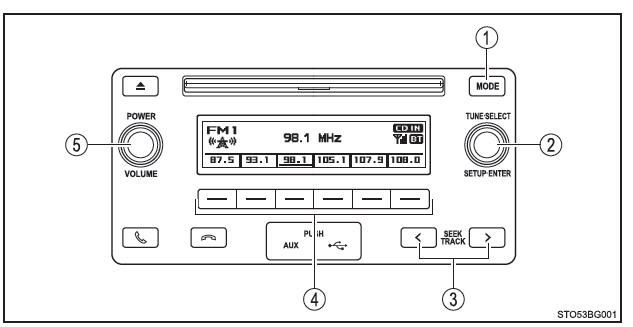
- AM/FM mode button
- Tune/scroll knob
Tunes the frequency - Frequency seek
- Station preset buttons
- Power/volume knob
Press: Turns the audio system on and off
Turn: Adjusts the volume
Storing Preset Stations
1. Search for the station you want by turning the tune/scroll knob or by pressing or to
 the "SEEK TRACK" button (Type A), or the button
 or "SEEK TRACK" (Type B).
2. Press and hold the station preset button you want until a beep confirms the setting.
Using the Station List (Type A only)
■ Updating the Station List
1. Press the "LIST" button (Type A).
The station list is displayed.
2. Press ("UPDATE") to update the list.
"Updating" is displayed during the search, then the available stations are listed on the screen.
To cancel the update, press the BACK button (Type A).
■ Selecting a Station from the List
1. Press the "LIST" button (Type A).
The station list is displayed.
2. Turn the tune/scroll knob to select a station.
3. Press the knob to tune to the station.
To return to the previous screen, press the BACK button (Type A).
RDS (Radio Data System) (Type A only)
This function allows your radio to receive the station.
■ Listening to Stations of the Same Network
1. Press the "SETUP" button.
2. Turn the tune/scroll knob until "RADIO" is displayed, then press it.
3. Turn the knob until the desired mode option is displayed: "FM AF" or "Region code".
4. Press the knob to select "ON" or "OFF".
FM AF mode set to ON: The system selects among stations of the same network those with good reception.
Region code mode set to ON: The system selects among stations of the same network those that broadcast the same program and have good reception.
■ Traffic information
1. Press the "SETUP" button.
2. Turn the tune/scroll knob until "RADIO" is displayed, then press it.
3. Turn the knob to "FM TA".
4. Press the knob to select "ON" or "OFF".
FM TA mode set to ON: The system automatically switches to traffic information mode when it receives a station broadcasting a traffic announcement.
The system returns to the station you were listening to before as soon as the traffic announcement ends.
■ EON (Enhanced Other Network) system (for traffic information function) (Type A only) If the RDS station you are listening to (broadcasting EON data) is not currently broadcasting a traffic announcement while the audio system is in TA (Traffic Announcement) mode, the radio automatically selects from the EON AF alternative frequency list a station broadcasting a traffic announcement as soon as one is received.
■ When the battery is disconnected Stored stations are erased.
■ Reception sensitivity
- It is difficult to guarantee perfect radio reception at all times, due to constantly changing antenna position, differences in signal strength, and surrounding obstacles (trains, other transmitters, etc.).
- The radio antenna is mounted on the rear of the roof.