Starting and driving
Activating and Deactivating Auto Hold
In this manual: Starting and driving
~1min read
The Auto-hold brake function at a standstill is activated with the button in the tunnel console.
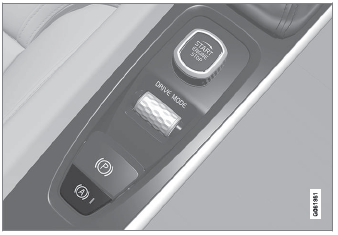
- Press the button in the tunnel console to activate or deactivate the function.
- The indicator light in the button will illuminate when the function is activated. The function will remain active the next time the vehicle is started.
When switched off
 If the function is active and holding the vehicle stationary using the normal brakes (A symbol lit in the instrument panel), the brake pedal must be depressed while pressing the button in order to deactivate Auto-hold.
- The function remains off until it is reactivated.
- When Auto-hold is switched off, Hill Start Assist (HSA) will remain active to help prevent the vehicle from rolling backward when starting up a hill.
Test yourself
A quick Volvo XC90 quiz: every answer comes with an explanation and a link to the manual page.
Was this page helpful?