Starting and driving
Applying and Releasing the Parking Brake
In this manual: Starting and driving
6steps
~36min
2/5difficulty
Done 0 of 6
Use the parking brake to help keep the vehicle stationary when parked.
Applying the Parking Brake

- Pull up the control.
- The symbol in the instrument panel will illuminate when the parking brake is activated.
- Make sure the vehicle is stationary.
Symbol in the instrument panel
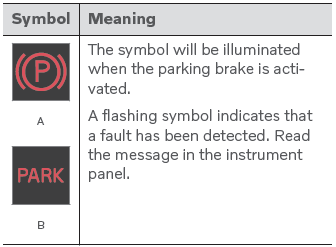
A Canadian models.
B US models.
Automatic Application
The parking brake is applied automatically
- when the ignition is switched off and the setting for automatically activating the parking brake is activated in the center display.
- when the gear selector is moved to P on a steep hill.
- if the auto-hold brake (automatic brake at standstill) function is activated and
- the vehicle has been stationary for a prolonged period of time (5-10 minutes).
- The vehicle is switched off.
- The driver has left the vehicle.
Emergency Braking
In an emergency, the parking brake can be activated when the vehicle is moving by pulling and holding up the control. The braking process is canceled when the control is released or if the accelerator pedal is depressed.
Releasing the Parking Brake
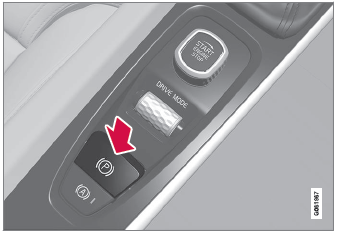
Manual Release
The parking brake can only be released when the engine is running.
- Press the brake pedal.
- Press the control.
- The parking brake will release and the symbol in the instrument panel will go out.
Automatic Release
- Start the vehicle.
- Depress the brake pedal firmly. Move the gear selector to D or R and press the accelerator pedal.
- The parking brake will release and the symbol in the instrument panel will go out.
Test yourself
A quick Volvo XC90 quiz: every answer comes with an explanation and a link to the manual page.
Was this page helpful?