Driving with Start/Stop Function
Start/stop is a function that temporarily turns off the engine when the vehicle is stationary and then automatically starts it when needed. The Start/Stop function is available when the ignition is started and can be activated if certain conditions are met.
The instrument panel indicates when the function is
- Available
- active
- not available.
All normal vehicle systems, such as lighting, radio, etc., function normally when the engine has been automatically stopped. Certain functions may be temporarily reduced, however, such as the climate system's blower speed or extremely high audio system volume.
Auto Stop
To automatically stop the engine:
- Stop the vehicle by applying the brakes and keep the brake pedal depressed. The engine will stop automatically.
In Comfort or Eco drive mode, the engine may auto-stop before the vehicle has completely stopped.
With Adaptive Cruise Control or Pilot Assist activated, the engine will auto-stop about three seconds after the vehicle has stopped.
Auto Start
The following conditions must be met for the engine to auto-start.
- Release the brake pedal. The engine will auto-start and the vehicle can be driven. On an uphill gradient, Hill Start Assist (HSA1 ) will activate to help prevent the vehicle from rolling backward.
- When the Auto-hold function is activated, auto-start will be delayed until the accelerator is pressed.
- When Adaptive Cruise Control or Pilot Assist are activated, the engine will autostart when the accelerator pedal is depressed or the
 button on the leftside steering wheel keypad is pressed.
- Maintain pressure on the brake pedal and press the accelerator pedal. The engine will auto-start.
- On a downhill gradient: release the brake pedal slightly so that the vehicle begins to roll. The engine will auto-start after a slight increase in speed.
Instrument panel symbols
 White – Displayed in the tachometer when the function is available.
 Green – Shown in the tachometer when the function is active and the engine is auto-stopped.
 Gray – When the symbol is grayedout with a line through it, the function is not available.
If the symbol is not shown, the function is disabled.
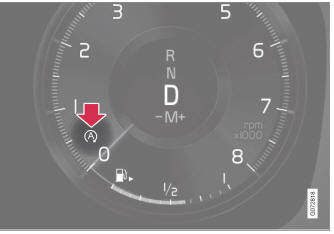
The function is active and the engine is in auto-stop.
On vehicles with the 8-inch instrument panel, the symbol will be shown at the bottom of the speedometer.
1 Hill Start Assist
Test yourself
A quick Volvo XC90 quiz: every answer comes with an explanation and a link to the manual page.