Starting and driving
Changing the Drive Mode
In this manual: Starting and driving
3steps
~18min
2/5difficulty
Done 0 of 3
(Option/accessory.)
Select the drive mode that suits the current driving conditions.
The drive mode is changed using the control in the center console.
Keep in mind that not all drive modes are available in all situations.
To change the drive mode:
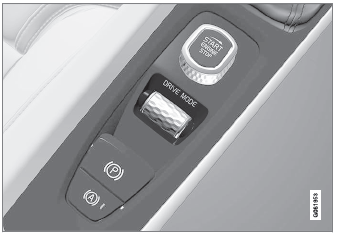
- Press the Drive Mode control.
- A pop-up menu will appear in the center display.
- Turn the wheel up or down to select the desired drive mode.
- Press the drive mode control or tap its button in the center display to confirm the selection.
- The selected drive mode is shown in the instrument panel.
Test yourself
A quick Volvo XC90 quiz: every answer comes with an explanation and a link to the manual page.
Was this page helpful?