Programming HomeLink®
(Option/accessory.) (Only certain markets.)
Follow these instructions to program HomeLink®, reset all programming, or program individual buttons.
- Point the remote control at the HomeLink® button to be programmed and hold it about 2-8 cm (1-3 inches) from the button. Do not obstruct the HomeLink® indicator light.
Note: Some remote controls are more effective at programming HomeLink® from a distance of about 15-20 cm (6-12 inches). Keep this in mind if you experience any programming difficulties.
- Press and hold both the remote control button and the HomeLink® button to be programmed.
- Do not release the buttons until the indicator light has stopped flashing slowly (about once a second) and either flashes quickly (about 10 times a second) or glows steadily.
- If the indicator light is on continuously: Indicates that programming is complete. Press the programmed button twice to activate.
If the indicator light flashes quickly: The device being programmed with HomeLink® may have a security function that requires an extra step. Try pressing the programmed button twice to see whether the programming works. Otherwise, continue with the following steps.
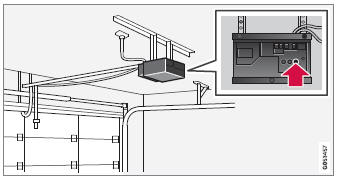
- If the indicator light is on continuously: Indicates that programming is complete. Press the programmed button twice to activate.
- Locate the "training" button1 on the receiver for the e.g. garage door opener. It is usually located near the antenna bracket on the receiver.
- Press and release the "Learn" button once. Programming must be completed within 30 seconds after pressing the button.
- Press and release the HomeLink® button to be programmed. Repeat the press/ hold/release sequence a second time. For some receivers, the sequence may need to be repeated a third time.
- Programming is now complete, and the garage door, gate, etc. should now be activated when the programmed button is pressed.
If you experience any difficulties programming, please contact HomeLink® at: homelink.com, or call 1–800–355–3515.
Programming individual buttons
To program an individual HomeLink® button:
- Press and hold the desired button for approximately 20 seconds.
- When the indicator light on HomeLink® starts flashing slowly, it is possible to program as usual.
Note: If the button you are reprogramming does not program with a new device, it will return to the previously saved programming.
Resetting HomeLink® buttons
All HomeLink® buttons can be reset at the same time. It is not possible to reset individual buttons. Individual buttons can only be reprogrammed.
- Press and hold the outer buttons (1 and 3) on HomeLink® for about 10 seconds.
- When the indicator light goes from a steady glow to flashing, the buttons have been reset and are ready for reprogramming.
1 The name and color of the button varies depending on the manufacturer.
Test yourself
A quick Volvo XC90 quiz: every answer comes with an explanation and a link to the manual page.