Trailer light check
When connecting a trailer, make sure that all of the lights on the trailer are functioning before starting to drive.
Trailer turn signals and brake lights
If one or more of the turn signals or brake lights on the trailer is not working, a symbol and message will be displayed in the instrument panel. The other lights on the trailer must be checked manually by the driver before the vehicle is driven.
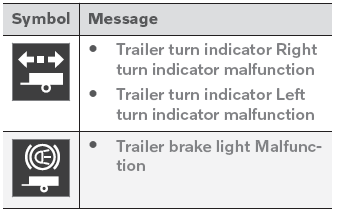
If any of the trailer's turn signal lights is not working, the turn signal symbol in the instrument panel will also flash more quickly than normal.
Trailer rear fog light
When a trailer is connected, the vehicle's rear fog light may not illuminate and rear fog light functionality is instead transferred to the trailer. If this is the case, check to see if the trailer is equipped with a rear fog light before activating the vehicle's fog lights when driving with a trailer to help ensure safe operation.
Trailer light check*
Automatic check
When the trailer has been connected to the vehicle's electrical system, its lights can be checked by automatically activating them. This function helps the driver check that the trailer's lights are functioning correctly before starting to drive.
To perform this check, the vehicle must be switched off.
- When a trailer is connected to the towbar, the message Automatic Trailer Lamp Check will appear in the instrument panel.
- Acknowledge the message by pressing the O button on the right-side steering wheel keypad.
- The light check will start.
- Get out of the vehicle to perform the check.
- All of the lights on the trailer will begin flashing, and then illuminate separately one at a time.
- Visually check that all trailer lights function correctly.
- After a short time, all of the trailer's lights will start flashing again.
- The light check is complete.
Deactivating the automatic check
The automatic trailer light check can be deactivated in the center display.
- Tap Settings in the Top view.
- Tap My Car
 Lights and Lighting.
- Deselect Automatic trailer light check.
Manual check
If the automatic check has been deactivated, the check can be started manually.
- Tap Settings in the Top view.
- Tap My Car
 Lights and Lighting.
- Select Manual trailer light check.
- The light check will start. Exit the vehicle to perform the check.
* Option/accessory.
Test yourself
A quick Volvo XC90 quiz: every answer comes with an explanation and a link to the manual page.