Drive Modes
(Option/accessory.)
Drive modes affect the vehicle's driving characteristics in different ways to enhance and simplify the driving experience in certain types of situations.
Drive modes enable easy access to the vehicle's many functions and settings in different driving situations. The following systems are adapted to help optimize driving characteristics in each drive mode:
- Steering
- Engine/Transmission/All-Wheel Drive*
- Brakes
- Air Suspension* and Shock Absorbers
- Instrument Panel
- Start/Stop Function
- Climate Control Settings
Select the drive mode that suits the current driving conditions. Keep in mind that not all drive modes are available in all situations.
Available Drive Modes
When the engine is started, the vehicle will be in Comfort mode and the start/stop function will be activated. Drive mode can be changed once the vehicle is started, e.g. to Individual mode. Once Individual mode is selected, you can adjust settings to personal preferences, e.g. to show the tachometer.
Comfort
Comfort is the vehicle's default mode. This setting offers driving comfort, light steering and soft suspension.
In Comfort mode, no tachometer will be displayed in the instrument panel1.
Eco
- Adapt the vehicle for more fuel-efficient and eco-friendly driving with Eco mode.
In this mode, the Start/Stop function is activated, the ground clearance is lower to reduce air resistance and certain climate settings are reduced.
When driving in Eco mode, an ECO gauge indicating how economical the driving is will be displayed in the instrument panel.
Off Road
- Helps maximize the vehicle's ability to traverse difficult terrain or poor roads.
In this mode, ground clearance is high, steering is light, and all-wheel drive* and the lowspeed function with assistance for driving downhill (HDC2) are activated. The Start/Stop function is deactivated.
This mode can only be activated at low speeds. The permitted speed range will be shown in the speedometer. If this speed is exceeded, Off-Road mode will be deactivated and another drive mode activated.
In Off-Road mode, a compass will be displayed between the speedometer and the tachometer in the instrument panel.
Dynamic
- Dynamic mode is designed to help provide sportier driving characteristics and a faster acceleration response.
Gear shifting will be faster and more distinct and the transmission will prioritize gears with a higher traction force.
Steering response is faster, suspension is stiffer and ground clearance is lower to help reduce body roll when cornering.
The start/stop function is deactivated.
Dynamic mode is also available in a Polestar Engineered* version.
Individual
- Adjusting the drive mode to personal preferences.
Select one of the drive modes as a basis and adjust the settings to achieve your preferred driving characteristics. These settings will be stored in the active driver profile and will be available every time the vehicle is unlocked with that remote key.
Individual drive mode is only available if it has been activated in the center display.
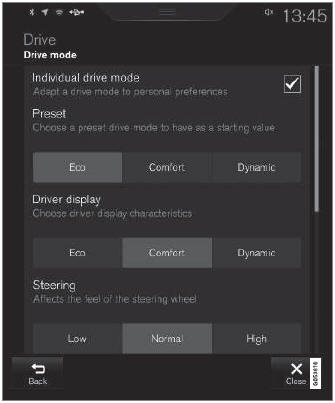
Settings view3 for Individual drive mode.
- Tap Settings in the Top view.
- Tap My Car
 Individual Drive Mode and select Individual Drive Mode.
- Under Preset, select one of the following drive modes as a basis: Eco, Comfort, Dynamic or Polestar Engineered*.
The following settings can be changed:
- Driver Display
- Steering Force
- Transmission Characteristics
- Brake Characteristics
- Suspension Control
- Eco Climate
- Start/Stop.
1 Applies only to vehicles with 8-inch instrument panels.
2 Hill Descent Control
3 The illustration is generic - details may vary according to vehicle model.
* Option/accessory.
Test yourself
A quick Volvo XC90 quiz: every answer comes with an explanation and a link to the manual page.