Level Control Settings
(Option/accessory.)
Turn off leveling control before lifting the vehicle with a jack to help avoid problems with the pneumatic suspension.
The vehicle can be lowered or raised to make it easier to load or for passengers to get in and out.
Load Setting Mode
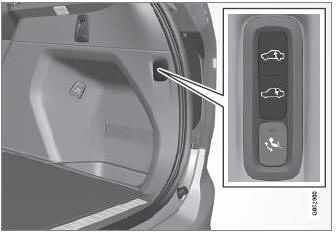
Use the buttons in the cargo compartment to raise or lower the rear section of the vehicle to facilitate loading or unloading the vehicle or connecting or disconnecting a trailer.
Center Display Settings
Easy Entry and Exit Lowering Function
The vehicle can be lowered to make it easier to get in and out.
To activate Easy Entry and Exit in the center display:
- Tap Settings in the Top view.
- Tap My Car
 Mirrors and Convenience.
- Select Easy Entry and Exit Lowering Function.
- When the vehicle is parked and the engine is turned off, the level is lowered. (Level adjustment will stop if a side door is opened and will resume after a slight delay when the door has been closed.) When the engine is started and the vehicle begins to move, the level will be raised to the height set by the selected drive mode.
Deactivating Level Control Monitoring
In certain situations this function must be deactivated, for example, before the vehicle is raised using a jack*. The level difference caused by raising the vehicle with a jack could cause problems with the pneumatic suspension.
To deactivate the function in the center display:
- Tap Settings in the Top view.
- Tap My Car
 Parking Brake and Suspension.
- Select Deactivate Level Control Monitoring.
* Option/accessory.
Test yourself
A quick Volvo XC90 quiz: every answer comes with an explanation and a link to the manual page.