Anzeige und Sprachsteuerung
Ändern von Einstellungen in der oberen Ansicht des Mitteldisplays
In diesem Handbuch: Anzeige und Sprachsteuerung
4Schritte
~24Min.
2/5Schwierigkeit
Erledigt 0 von 4
You can change settings and information for many of the vehicle's functions via the center display.
- Open Top view by tapping the tab at the top of the screen or by dragging/swiping from the top of the screen downward.
- Tippen Sie auf Einstellungen, um das Einstellungsmenü zu öffnen.
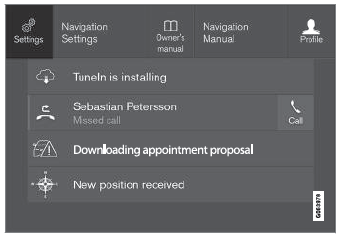
Übersicht mit Schaltfläche „Einstellungen“.
- Tap one of the categories and sub-categories to navigate to the desired setting.
- Change the setting(s). Different types of settings are changed in different ways.
- Änderungen werden sofort gespeichert.

A sub-category in the Settings menu with various possible settings; has a multi-selection button and radio buttons.
Testen Sie sich
Ein kurzes Quiz zum Volvo XC90: Zu jeder Antwort gibt es eine Erklärung und einen Link zur Handbuchseite.
War diese Seite hilfreich?