Display e comandi vocali
Modifica delle impostazioni nella Vista superiore del display centrale
In questo manuale: Display e comandi vocali
4passaggi
~24min
2/5difficoltà
Completati 0 di 4
You can change settings and information for many of the vehicle's functions via the center display.
- Open Top view by tapping the tab at the top of the screen or by dragging/swiping from the top of the screen downward.
- Toccare Impostazioni per aprire il menu Impostazioni.
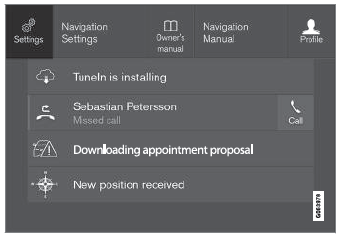
Vista superiore con il pulsante Impostazioni.
- Tap one of the categories and sub-categories to navigate to the desired setting.
- Change the setting(s). Different types of settings are changed in different ways.
- Le modifiche vengono salvate immediatamente.

A sub-category in the Settings menu with various possible settings; has a multi-selection button and radio buttons.
Mettiti alla prova
Un breve quiz sulla Volvo XC90: ogni risposta ha una spiegazione e un link alla pagina del manuale.
Questa pagina ti è stata utile?