Aktivieren und Deaktivieren der Head-up-Anzeige
(Option/Zubehör.)
The head-up display can be activated and deactivated when the vehicle has been started.
 Press the Head-Up Display button in the center display's Function view. An indicator light in the button will illuminate when the function is activated.
Einstellungen der Head-up-Anzeige
Einstellungen für die Head-up-Anzeige vornehmen.
Settings can be adjusted when the vehicle is started and a projected image is displayed on the windshield.
Auswahl der Anzeigeoptionen
Wählen Sie die Funktionen aus, die in der Head-up-Anzeige angezeigt werden sollen.
- Tippen Sie in der Draufsicht des Mittelbildschirms auf Einstellungen.
- Tap My Car
 Displays
 Head-Up Display Options.
- Select one or more functions:
- Navigation anzeigen
- Verkehrszeicheninformationen anzeigen
- Fahrerassistenz anzeigen
- Telefon anzeigen
Diese Einstellung wird als persönliche Einstellung im Fahrerprofil gespeichert.
Einstellen der Helligkeit und der Höhenposition

- Drücken Sie die Schaltfläche Display-Einstellungen in der Funktionsansicht des Mitteldisplays.
- Adjust the brightness of the projected image and the height position in the driver's field of vision using the right-side steering wheel lever.
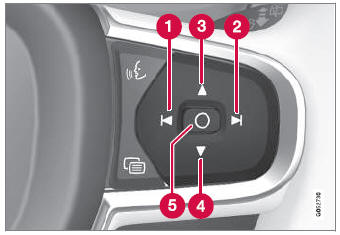
 Decreasing brightness
 Increasing brightness
 Raising position
 Lowering position
 Confirm
The brightness of the graphic is automatically adapted to the light conditions in its background. Brightness is also affected by adjustments to the brightness of the other displays in the vehicle.
The height position can be stored in the front power seat's* memory function using the keypad in the driver's door.
Kalibrierung der horizontalen Position
If the windshield or display unit has been replaced, the head-up display's horizontal position may need to be calibrated. Calibration means that the projected image is rotated clockwise or counterclockwise.
- Tippen Sie in der Draufsicht des Mittelbildschirms auf Einstellungen.
- Select My Car
 Displays
 Head-Up Display Options
 Head-Up Display Calibration.
- Calibrate the horizontal position of the image using the right-side steering wheel keypad.
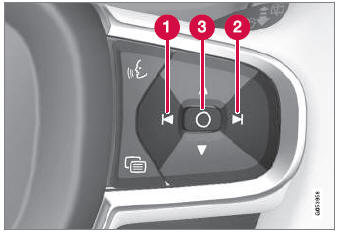
 Rotate counterclockwise
 Rotate clockwise
 Confirm
* Option/Zubehör.
Testen Sie sich
Ein kurzes Quiz zum Volvo XC90: Zu jeder Antwort gibt es eine Erklärung und einen Link zur Handbuchseite.