Anzeige und Sprachsteuerung
Bedienung des App-Menüs im Kombiinstrument
In diesem Handbuch: Anzeige und Sprachsteuerung
3Schritte
~18Min.
2/5Schwierigkeit
Erledigt 0 von 3
The App menu in the instrument panel is controlled using the right-side steering wheel keypad.
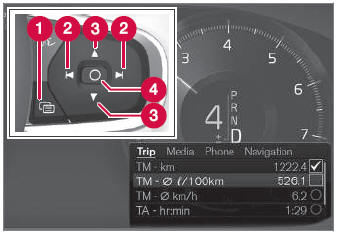
App-Menü und Lenkradtasten rechts. Die Abbildung dient nur zur allgemeinen Darstellung.
 Open/close
 Left/right
 Up/down
 Confirm
App-Menü öffnen und schließen
- Tap open/close (1).
- Das App-Menü wird geöffnet/geschlossen.
The App menu turns off automatically after a period of inactivity or after certain selections are made.
Navigation und Auswahl im App-Menü
- Navigate between apps by tapping left or right (2).
- Funktionen für die vorherige/nächste App werden im App-Menü angezeigt.
- Scroll through the functions for the selected app using the up or down arrows (3).
- Confirm or make a selection for the function by pressing confirm (4).
- The function will be activated and, for some selections, the App menu will then close.
The next time the App menu is opened, the functions for the most recently selected app will be displayed automatically.
Testen Sie sich
Ein kurzes Quiz zum Volvo XC90: Zu jeder Antwort gibt es eine Erklärung und einen Link zur Handbuchseite.
War diese Seite hilfreich?