Fahrerunterstützung
Auswahl und Aktivierung von Pilot Assist
In diesem Handbuch: Fahrerunterstützung
2Schritte
~12Min.
2/5Schwierigkeit
Erledigt 0 von 2
(Option/Zubehör.)
(Je nach Markt kann diese Funktion serienmäßig oder optional sein.)
Pilot Assist must first be selected and then activated before it can regulate speed and distance and provide steering assistance.
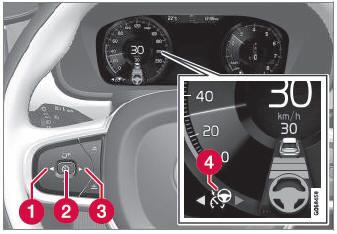
A green steering wheel indicates that Pilot Assist is providing steering assistance.
So starten Sie Pilot Assist:
- Der Fahrersicherheitsgurt muss angelegt und die Fahrertür muss geschlossen sein.
- The side markings of the lane must be clearly visible and detected by the vehicle.
- There must be a vehicle ahead (target vehicle) within a reasonable distance or your vehicle's current speed must be at least 15 km/h.
- Die Geschwindigkeit darf 140 km/h nicht überschreiten.
- Der Fahrer muss die Hände am Lenkrad halten.
- There must be a vehicle ahead (target vehicle) within a reasonable distance or your vehicle's current speed must be at least 15 km/h.
- Press the
 (1) or
 (3) button on the steering wheel keypad and scroll to the Pilot Assist symbol
 (4).
- Graues Symbol – Pilot Assist befindet sich im Standby-Modus.
- When Pilot Assist is selected, press
 (2) on the steering wheel keypad to activate.
- White symbol – Pilot Assist starts and the current speed is stored as the maximum speed.
Reaktivierung von Pilot Assist auf die zuletzt gespeicherte Geschwindigkeit
- When Pilot Assist is selected, press
 on the steering wheel keypad to activate.
- The Cruise Control marking in the instrument panel will change from GRAY to WHITE and the vehicle will then return to the most recently set speed.
Testen Sie sich
Ein kurzes Quiz zum Volvo XC90: Zu jeder Antwort gibt es eine Erklärung und einen Link zur Handbuchseite.
War diese Seite hilfreich?