Fahrerunterstützung
Auswahl und Aktivierung der Adaptiven Geschwindigkeitsregelung
In diesem Handbuch: Fahrerunterstützung
2Schritte
~12Min.
2/5Schwierigkeit
Erledigt 0 von 2
(Je nach Markt kann diese Funktion serienmäßig oder optional sein.)
Adaptive Cruise Control (ACC1 ) must first be selected and then activated before it can regulate speed and distance.
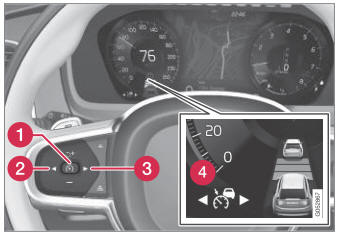
So starten Sie die Funktion:
- Der Fahrersicherheitsgurt muss angelegt und die Fahrertür muss geschlossen sein.
- There must be a vehicle ahead (target vehicle) within a reasonable distance or your vehicle's current speed must be at least 15 km/h.
- Press the
 (2) or
 (3) button on the steering wheel keypad and scroll to the Adaptive Cruise Control symbol
 (4).
- Graues Symbol – Adaptive Geschwindigkeitsregelung befindet sich im Standby-Modus.
- When Speed Limiter is selected, press
 (1) on the steering wheel keypad to activate.
- White symbol – Speed Limiter starts and the current speed is stored as the maximum speed.
Reaktivierung der Adaptiven Geschwindigkeitsregelung auf die zuletzt gespeicherte Geschwindigkeit
- When Adaptive Cruise Control is selected, press
 on the steering wheel keypad to activate.
- The Cruise Control marking in the instrument panel will change from GRAY to WHITE and the vehicle will then return to the most recently set speed.
1 Adaptiver Tempomat
Testen Sie sich
Ein kurzes Quiz zum Volvo XC90: Zu jeder Antwort gibt es eine Erklärung und einen Link zur Handbuchseite.
War diese Seite hilfreich?