Aide à la conduite
Sélection et activation de Pilot Assist
Dans ce manuel : Aide à la conduite
2étapes
~12min
2/5difficulté
Fait 0 sur 2
(Option/accessoire.)
(Selon le marché, cette fonction peut être de série ou en option.)
Pilot Assist must first be selected and then activated before it can regulate speed and distance and provide steering assistance.
A green steering wheel indicates that Pilot Assist is providing steering assistance.
Pour démarrer Pilot Assist.
- La ceinture de sécurité du conducteur doit être bouclée et la porte conducteur fermée.
- The side markings of the lane must be clearly visible and detected by the vehicle.
- There must be a vehicle ahead (target vehicle) within a reasonable distance or your vehicle's current speed must be at least 15 km/h.
- La vitesse ne doit pas dépasser 140 km/h.
- Le conducteur doit garder les mains sur le volant.
- There must be a vehicle ahead (target vehicle) within a reasonable distance or your vehicle's current speed must be at least 15 km/h.
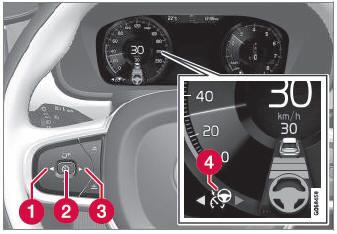
- Press the
 (1) or
 (3) button on the steering wheel keypad and scroll to the Pilot Assist symbol
 (4).
- Symbole gris : Pilot Assist est en mode veille.
- When Pilot Assist is selected, press
 (2) on the steering wheel keypad to activate.
- White symbol – Pilot Assist starts and the current speed is stored as the maximum speed.
Réactivation de Pilot Assist à la dernière vitesse mémorisée
- When Pilot Assist is selected, press
 on the steering wheel keypad to activate.
- The Cruise Control marking in the instrument panel will change from GRAY to WHITE and the vehicle will then return to the most recently set speed.
Testez-vous
Un quiz rapide sur Volvo XC90 : chaque réponse est expliquée, avec un lien vers la page du manuel.
Cette page vous a-t-elle été utile ?