Brake Light Switch
On the Audi 80, the brake light switch is located just above the brake pedal and is accessible only after removing the lower left panel (see Interior section). When the pedal is depressed, the switch plunger extends outward and closes the contact to the brake lights.
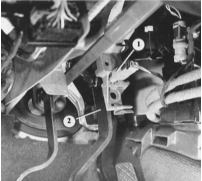
After removing the lower left panel under the instrument panel, the brake light switch (1) becomes accessible. It is located in its holder just above the brake pedal (2).
Adjusting the Brake Light Switch
PROCEDURE
Remove the lower left panel under the instrument panel.
Press the brake pedal by hand.
Firmly push the brake light switch forward along its guide until it stops.
Now release the brake pedal and pull the switch back until it stops.
As a result of these actions, the brake light switch will automatically assume the correct position.
Checking the Brake Light Switch
PROCEDURE
Disconnect the wire terminal.
Install a jumper between the wire connections in the connector.
If the brake lights now illuminate, the brake light switch was faulty.
Test yourself
A quick Audi 80 quiz: every answer comes with an explanation and a link to the manual page.