Using the remote control
 Do not give your main vehicle keys to unknown persons.
If you need to leave the keys, for example with a hotel employee, give them the spare key.◄
Persons or animals remaining in the vehicle may lock the doors from inside. Therefore, always take the keys with you when leaving the vehicle.◄
Unlocking
To unlock the vehicle, press the button .
iDrive operating principles
1. Press the button .
The main menu opens.
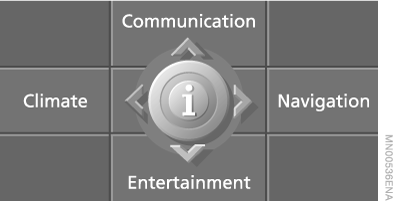
2. Press the controller to open the menu .
3. Select “Vehicle settings” and press the controller.
4. Select “Door locks” and press the controller.
5. Select “Central locking” and press the controller.
6. Select “Lock button” and press the controller.
7. Select the following item in the menu:
► “All doors” When the button is pressed once all locks of the vehicle unlock.
► “Driver's door only” When the button is pressed once only the driver's door and the fuel filler flap unlock.
All locks of the vehicle unlock when the button is pressed twice.
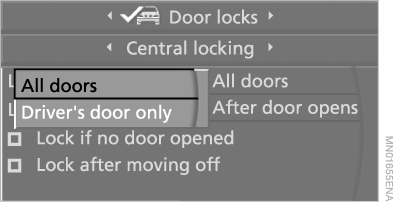
8. Press the controller.
This setting is stored in the memory for the key currently in use.
Comfort opening
Press and hold the button.
The windows and the sunroof open.
Locking
Press the button .
When leaving the vehicle, do not lock it if people remain inside, otherwise they will not be able to unlock the doors from the inside.◄
Comfort closing
Press and hold the button.
The windows and sunroof close.
When closing, make sure no one is trapped. All actuators stop when the key is released.◄
Switching on the interior lighting
With the vehicle locked, press the button.
This function helps you quickly locate your vehicle, for example in an underground car park.
Sedan: opening the trunk lid
Press and hold the button pressed for approximately 1 second.
The trunk lid unlatches slightly, regardless of whether it was locked or not.
 When opening, the trunk lid moves rearward and upward. Make sure there are no obstacles within its travel range.
If the trunk lid was locked before, it locks again after closing.◄
Touring: opening the luggage compartment door
Press and hold the button pressed for approximately 1 second.
The luggage compartment door unlatches slightly, regardless of whether it was locked or not.
 When the luggage compartment door is opened, the luggage compartment cover rises.
Before closing the luggage compartment door, press the cover down until it locks.
To prevent luggage from damaging the heating wires in the rear window, wrap sharp edges with protective material.◄
Programming confirmation signals
You can program visual confirmation signals for locking and unlocking the vehicle.
1. Open the home screen.
2. Press the controller to go to the menu .
3. Select "Vehicle settings" and press the controller.
4. Select "Door locks" and press the controller.
5. Select "Confirmation" and press the controller.
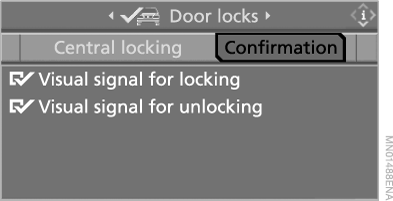
6. Select the preferred signal.
7. Press the controller.
 indicates the enabled signals.
Interference
Radio waves may interfere with remote control operation. In this case, you can unlock or lock the vehicle by inserting the key into the door lock.
If remote locking does not work, the battery is discharged. Insert this key into the ignition lock during a fairly long drive.
Test yourself
A quick BMW X5 quiz: every answer comes with an explanation and a link to the manual page.