Controls
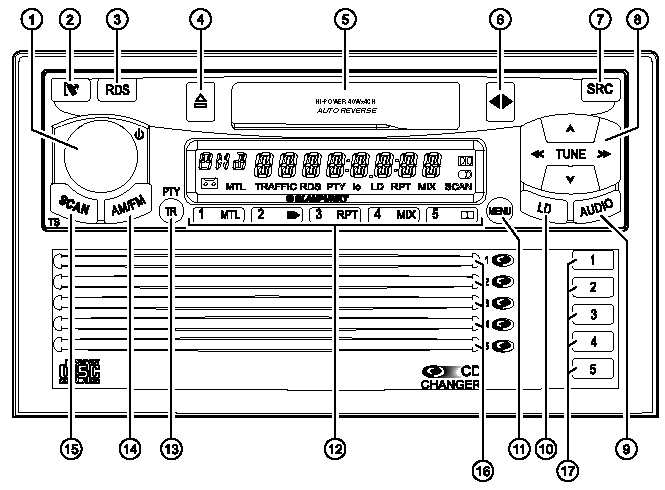
CONTROLS
1. Volume control, used to turn the radio on/off or mute the sound.
2. Button , used to remove the detachable control panel.
3. RDS button, used to turn the RDS (Radio Data System) function on/off. Scrolling text display.
4. Tape eject.
5. Tape compartment.
6. Button , used to change the tape side.
7. SRC button, used to select the playback source: radio, tape, multi-disc CD player.
8. Arrow buttons.
9. AUDIO button, used to adjust the sound (bass/treble) and sound distribution settings (stereo balance, front-rear balance).
10. LD button, used to activate the loudness function.
11. MENU button, used to access the main setup menu.
12. Preset buttons 1 – 5.
13. TR (Traffic) button, used to turn traffic information mode on/off. PTY button, used to turn the PTY function on/off.
14. AM/FM (wave band) button, used to select the radio reception mode, FM memory level, and MW and LW wave bands.
15. SCAN button, used to start the scan function. TS button, used to start automatic tuning and radio memory programming.
16. CD compartments 1–5.
17. CD select and eject button.
Test yourself
A quick Chevrolet Lacetti quiz: every answer comes with an explanation and a link to the manual page.