SETTING THE DATE AND TIMEThe SETUP function provides access to the following options: Languages, Date and time, Display (Brightness, Colour harmony, Map colour), Vehicle settings, Units, System settings.! This setting is required after any disconnection of the battery.
1. Press the SET UP button.
2. Select the “Date and time” function and press the rotary knob to confirm.
3. Select the “Set date and time” function and press the rotary knob to confirm.
4. Adjust the settings one by one using the directional arrows, confirming each with the rotary knob.
5. Select the “Date format” function and press the rotary knob to confirm.
6. Confirm the desired format using the rotary knob. Select the “Time format” function and press the rotary knob to confirm.
Confirm the desired format using the rotary knob.
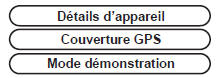
Pressing and holding the SET UP button for more than 2 seconds gives access to:
?
Test yourself
A quick Citroen C5 quiz: every answer comes with an explanation and a link to the manual page.






 Press the SET UP button.
 Select the “Date
 Select the “Set
 Adjust the settings one by one using the
 Select the “Date
 Confirm the desired format using
 Confirm the desired format using