Audio and telematics
Getting Started
In this manual: Audio and telematics
15steps
~90min
4/5difficulty
Done 0 of 15
MyWay FRONT PANEL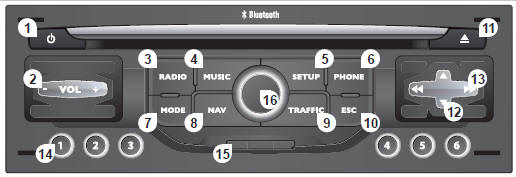
MyWay front panel
MyWay front panel
- Engine off
- Short press: on/off.
- Long press: pause CD playback, mute the radio.
Engine running
- Short press: pause CD playback, mute the radio.
- Long press: system reset.
- Volume adjustment (each source is independent, including navigation messages and alerts).
- Access the "Radio" menu. Display the list of stations.
- Access the "Music" menu. Display the tracks. Long press: access the audio settings: front/rear balance, left/right balance, bass/treble, music ambiances, loudness, automatic volume correction, reset the settings.
- Access the "SETUP" menu. Long press: access GPS coverage and demonstration mode.
- Access the "Phone" menu. Display the call log.
- Access the "MODE" menu.
Successively select the display of: Radio, Map, NAV (if navigation is in progress), Phone (if a call is in progress), On-board computer.
Long press: display a black screen (DARK).
- Access the "Navigation" menu. Display the latest destinations.
- Access the "Navigation" menu. Display the latest destinations.
- ESC: cancels the current operation.
- ESC: cancels the current operation.
- Select previous/next radio station in the list.
Select previous/next MP3 folder.
Select previous/next page of a list.
- Select previous/next radio station.
Select previous/next CD or MP3 track.
Select previous/next line of a list.
- Buttons 1 to 6: select a stored radio station.
Long press: store the station being listened to.
- Navigation SD card reader only.
- Selector wheel for the on-screen display and depending on the menu context.
Short press: contextual menu or confirm.
Long press: contextual menu specific to the displayed list.
Test yourself
A quick Citroen C5 quiz: every answer comes with an explanation and a link to the manual page.
Was this page helpful?