Phone
Check your device compatibility on the regional website.
Pairing Your Mobile Phone for the First Time
Go to the settings menu on your mobile phone and turn on Bluetooth.
 Select the phone option on the function bar.
- Select Add Phone .
- Select your vehicle on your mobile phone.
- Make sure the number on your mobile phone matches the number on the touchscreen.
- Download the phonebook from your mobile phone when prompted.
Using Your Mobile Phone
Recent Calls List
Display and select an entry from the recent calls list.
Contacts
Display the smart search form to search for your contacts. Use the List button to sort contacts alphabetically.
Change Device
Display the list of paired or connected devices you can select.
Phone Settings
Change ringtones, alerts, or connect a different phone.
Do Not Disturb
Reject incoming calls and turn off ringtones and alerts.
Phone Keypad
Direct dial a number.
Mute
Turn off the microphone.
Message Text
Setting Up Text Message Notifications
iOS
- Go to the settings menu on your mobile phone.
- Select Bluetooth.
- Select the information icon to the right of your vehicle.
- Turn on text message notifications.
Android
- Go to the settings menu on your mobile phone.
- Select Bluetooth.
- Select the profiles option.
- Select the phone profile.
- Turn on text message notifications.
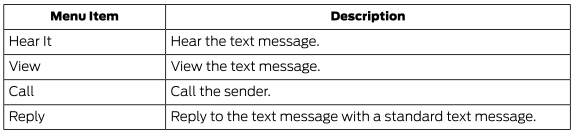
Using Text Messaging
Apple CarPlay (if equipped)
- Connect your device to the USB port.
- Follow the instructions on the touchscreen.
Turning Off Apple CarPlay
 Select the settings icon on the function bar.
Select Apple CarPlay Settings .
Turn the Apple CarPlay switch off.
Android Auto (if equipped)
- Connect your device to the USB port.
- Follow the instructions on the touchscreen.
Turning Android Auto Off
 Select the settings icon on the function bar.
- Select Android Auto.
- The Android Auto switch is off.
Test yourself
A quick Ford Explorer quiz: every answer comes with an explanation and a link to the manual page.