Using Voice Recognition
The system allows you to interact with the entertainment, information and communication systems of your vehicle using voice commands. This allows you to keep your hands on the steering wheel and focus on the road ahead.
 Press the voice control button on the steering wheel and wait for the voice prompt.
The following voice commands can be used from any screen:
- Command List
- Help
The following tables list some of the most commonly used voice commands. For a complete list of voice commands, see our website.
General
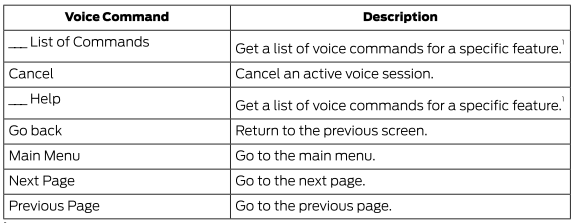
1 Add the feature name to the command.
Entertainment
Audio Source

Radio
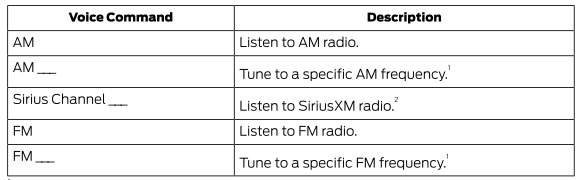
1 Add the radio frequency up to two decimal places to the command.
2 You can say the name or number of the Sirius channel, for example "Sirius Channel 16" or "Sirius Channel Pulse".
USB and Media Player
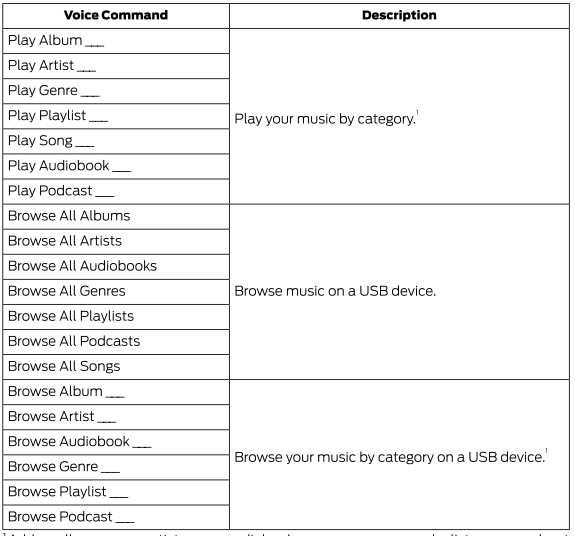
1 Add the album name, artist name, audiobook title, genre name, playlist name, podcast name or track title to the command. Say the name exactly as it is written on your device.
Climate (if equipped)
You can control the vehicle temperature using voice commands.
___ is a dynamic list, meaning that for climate control voice commands it can be the desired degrees for setting the temperature.
To adjust the temperature, say:

Phone
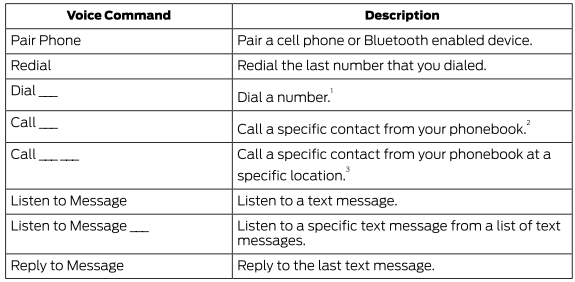
1 Add the number you want to dial to the command.
2 Add the contact name from the phonebook to the command. Say the first and last name of your contact exactly as it appears on your device.
3 Add the name and location of the contact from the phonebook to the command. Say the first and last name of your contact exactly as they appear on your device.
Navigation (If Equipped)
Setting a Destination
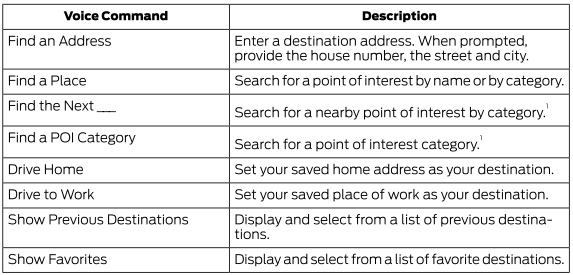
1 Add a points of interest category or the name of a major brand or chain to the command.
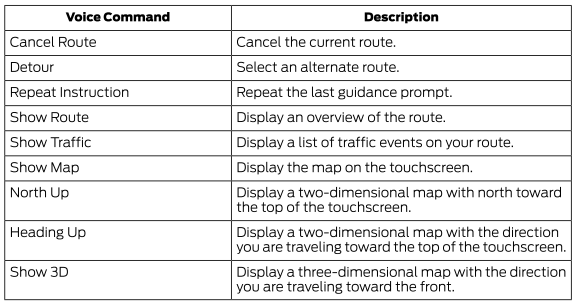
Route Guidance
Apps
General
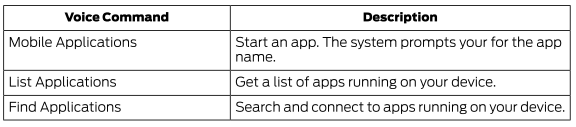
Active Application

1 Add the application name to the command.
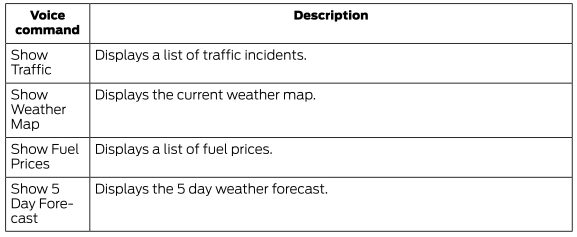
SiriusXM Traffic and Travel Link (if equipped)
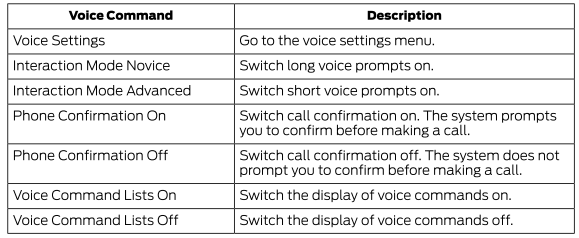
Voice Settings
Automatic Fan Speed Reduction
When necessary, the system reduces the fan speed when using voice commands to reduce background noise in the vehicle. It returns to normal when you finish.
Turning Off Automatic Fan Speed Reduction
Press the A/C button and the recirculation button at the same time.
Test yourself
A quick Ford Explorer quiz: every answer comes with an explanation and a link to the manual page.