Apps
The system lets you interact with selected mobile apps without taking your eyes off the road. Voice commands, your steering wheel buttons, or quick touches on the touchscreen give you enhanced control over compatible mobile apps. You can also stream your favorite music or podcasts, share your arrival time with friends, and stay connected safely.
When you first launch an app through the system, you may be asked to grant certain permissions. You can review and change the permissions you have granted at any time when your vehicle is not moving. We recommend you check your data plan before using an app through the system, as using them may result in additional charges. We also recommend you review the app provider's terms and privacy policy before using their app. Make sure you have an active account for the apps you want to use through the system. Some apps will work without setup. Others require some personal settings to be configured before you can use them.
Using Apps on an iOS Device
 Select the apps option on the function bar.
- If your device is connected through USB, turn off Apple CarPlay.
- Connect your device to the USB port or pair and connect using Bluetooth.
- If prompted to enable CarPlay, select Don't Allow.
- Launch the apps on your device that you want to use through SYNC.
- Select the application you want to use on the touchscreen.
Using Applications on an Android Device
 Select the apps option on the function bar.
- If your device is connected through USB, turn off Android Auto.
- Pair your device.
- Launch the apps on your device that you want to use through SYNC.
- Select Find Mobile Apps.
- Select the application you want to use on the touchscreen.
Using Mobile Navigation on an Android Device
- Connect your device to the USB port.
- Turn off Android Auto.
- Turn on Enable Mobile Applications via USB on the Mobile Applications settings tile.
- Select the Applications option for the Features bar.
- Select the navigation application you want to use on the touchscreen.
- Note: When using a navigation application, your device must remain unlocked and the application must be open.
SiriusXM Traffic and Travel Link (if equipped)
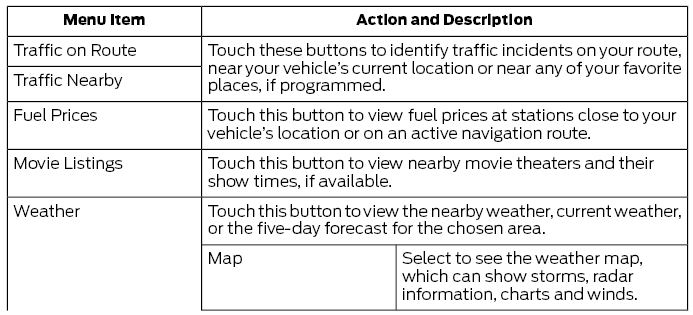
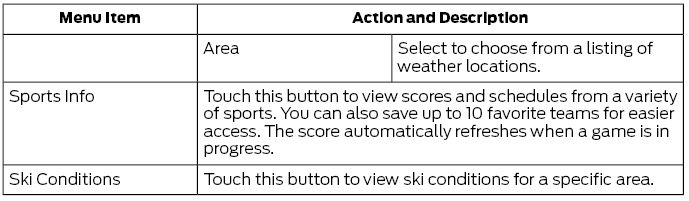
When you subscribe to SiriusXM Traffic and Travel Link, you can find the best gas prices, find movie listings, receive current traffic alerts, view the current weather map, get accurate ski conditions and see current sports game scores.
Test yourself
A quick Ford Fusion quiz: every answer comes with an explanation and a link to the manual page.