General Information
About SYNC
The system allows you to interact with entertainment, information and communication systems in your vehicle using voice commands and the touchscreen. The system provides convenient interaction with audio, phone, navigation, mobile applications and settings.
Using the Touchscreen
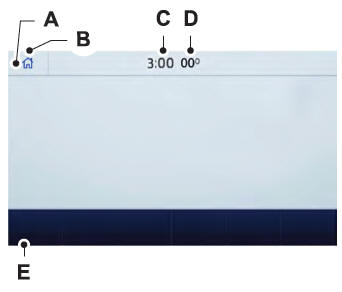
- Status Bar.
- Home Screen.
- Clock.
- Outside Air Temperature.
- Function Bar.
Status Bar
 Cellular phone microphone muted.
 Audio system muted.
 Software update installed.
 Wi-Fi connected.
 Cellular roaming.
 Text message received.
 Automatic crash notification system off.
 Cellular network signal strength.
Function bar
 Select to use radio, USB, media player or Bluetooth device.
 Select to adjust climate settings.
 Select to make calls and access the phone book on your mobile phone.
 Select to use the navigation system.
 Select to find and use compatible apps on an iOS or Android device.
 Select to adjust system settings.
Cleaning the touchscreen
See Cleaning the Interior.
System Update
Updating the System Using a USB Drive
Downloading the Update
- Go to the SYNC update page on the local Ford website.
- Download the update.
- Insert the USB drive into the computer.
- Follow the instructions provided to download the update to the USB drive.
Installing the Update
- Disconnect all other USB devices from the USB ports.
- Connect the USB drive with the update to a USB port.
Updating the System Using a Wi-Fi Network Connection
Connecting to a Wi-Fi Network
 Select the settings option on the function bar.
- Select Automatic Updates.
- Select System Wi-Fi.
- Turn System Wi-Fi on.
- Select Available Wi-Fi Networks.
- Select an available Wi-Fi network.
Turning On Automatic System Updates
 Select the settings option on the function bar.
- Select Automatic Updates.
- Turn Automatic System Updates on.
The system is now set to check for and receive system updates when connected to a Wi-Fi network.
Additional Information and Assistance
For more information and assistance, we recommend contacting an authorized dealer or visiting the local Ford website.
Test yourself
A quick Ford Fusion quiz: every answer comes with an explanation and a link to the manual page.